 PH
PH1. Login to your router address and check the signal of your device if it can reach 4G signal if not then no choice but 3G.
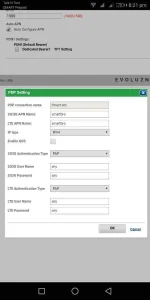
2. Click on the internet section choose LTE mode, automatic connection and check auto apn, then click on the PDN setting then set it to smartbro for both name and choose ipv4 and choose PAP for authentication type and set password and username to any. Then save the changes.
3. If you think your routers DNS is bad then change it, here are some DNS that i have used, 1.1.1.1 and 1.0.0.1 or 203.111.121.106. Of not then just leave it to default.
P.S. DNS doesnt always the same speed as others so have time to look for good DNS and run some tests.. On your computer.
4. Choosing the right 802.11 mode, try to do some experiment 802.11n is not always the best mode, it varies depending on your location, in my opinion. So try changing the mode as well as the channels from automatic to choosing other channel, my suggestion is try using 802.11 b/g and click automatic channel or choose from channels;1,3, 6,8 or 11.
5. Puting wifi encryption can affect the speed by 30% slower. You may want to research this for yourself cause it is broad.. Peace
6. Oven, TV, Ref. Etc can affect your routers signal.
7. For better surfing always update your routers firmware to the latest....
Hope it helps.
2. Click on the internet section choose LTE mode, automatic connection and check auto apn, then click on the PDN setting then set it to smartbro for both name and choose ipv4 and choose PAP for authentication type and set password and username to any. Then save the changes.
3. If you think your routers DNS is bad then change it, here are some DNS that i have used, 1.1.1.1 and 1.0.0.1 or 203.111.121.106. Of not then just leave it to default.
P.S. DNS doesnt always the same speed as others so have time to look for good DNS and run some tests.. On your computer.
4. Choosing the right 802.11 mode, try to do some experiment 802.11n is not always the best mode, it varies depending on your location, in my opinion. So try changing the mode as well as the channels from automatic to choosing other channel, my suggestion is try using 802.11 b/g and click automatic channel or choose from channels;1,3, 6,8 or 11.
5. Puting wifi encryption can affect the speed by 30% slower. You may want to research this for yourself cause it is broad.. Peace
6. Oven, TV, Ref. Etc can affect your routers signal.
7. For better surfing always update your routers firmware to the latest....
Hope it helps.
Attachments
-
 Screenshot_20180627-202339.jpg30.2 KB · Views: 141
 -
 Screenshot_20180627-202143.webp30.3 KB · Views: 222
 -
 Screenshot_20180627-202532.jpg34.9 KB · Views: 103
 -
 Screenshot_20180627-202523.jpg20.5 KB · Views: 93
 -
 Screenshot_20180627-202131.jpg32.7 KB · Views: 117
 -
 Screenshot_20180627-202117.jpg53.3 KB · Views: 125


