 PH
PHMcent Browser tricks 100% working!!!!

You do not have permission to view the full content of this post. Log in or register now.
- First of all, Download the mcent browser app from playstore:
- After that install and open it
- Create your account.
- Then, install 2ndline-second phone number in google play store
- Follow the step below
You do not have permission to view the full content of this post. Log in or register now.
Attachments
-
 Screenshot_2018-06-24-13-00-47-349_com.android.vending.png103.2 KB · Views: 3
 -
 Screenshot_2018-06-24-03-40-22-358_com.mcent.browser.png51.5 KB · Views: 3
 -
 Screenshot_2018-06-24-03-34-38-119_com.android.vending.png86.7 KB · Views: 2
 -
 Screenshot_2018-06-24-03-36-50-275_com.enflick.android.tn2ndLine.png11.7 KB · Views: 2
 -
 Screenshot_2018-06-24-03-37-16-880_com.enflick.android.tn2ndLine.png18.4 KB · Views: 2
 -
 Screenshot_2018-06-24-03-37-39-897_com.enflick.android.tn2ndLine.png14.3 KB · Views: 2
 -
 Screenshot_2018-06-24-03-34-04-386_com.mcent.browser.webp61.2 KB · Views: 18
 -
 Screenshot_2018-06-24-03-34-09-470_com.mcent.browser.png45.6 KB · Views: 2
 -
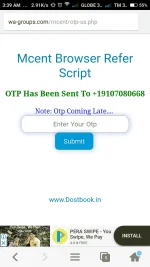 Screenshot_2018-06-24-03-39-03-112_com.mcent.browser.webp61.1 KB · Views: 16
 -
 IMG_20180624_130818.jpg68.2 KB · Views: 3
 -
 Screenshot_2018-06-24-12-33-58-786_com.mcent.browser.webp61 KB · Views: 17
 -
 Screenshot_2018-06-24-12-34-17-372_com.mcent.browser.png26.4 KB · Views: 2
 -
 IMG_20180624_130745.jpg62 KB · Views: 2
 forbidden..anyways thanks for sharing