PH
PHHello po mga ka PHC.
*Do at your own risk.
I cannot assure you that this tutorial will work 100%.(I've got no proof to show to you Cause I barely even tried it.)
But if you are looking forward to boost your Internet connection, well you can try doing this tutorial. (Wala namang mawawala eh.)
AGAIN.We're Going to try to boost your Internet connection.
Requirements:
☆.Android Phone (rooted)
☆.SIM card (any network)
☆.Mtk engineering mode (android app or yung code na ida-dial siguro to.)
Let's Go.
>Dial *#*#3646633#*#*
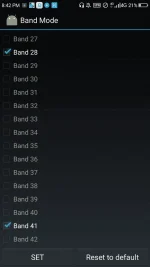
>go to bandmode and select which sim you're using for data connection
>check the band WCDMA-IMT-2000 only
>go back to engineering mode then select mobile data service preferred then check at mobile data full speed
> change your APN(kung meron ka)
¤ GLOBE
Apn: internet.globe.com.ph
Apn type: default,supl
Server: You do not have permission to view the full content of this post. Log in or register now.
¤ TNT
Apn: rcomnet
Port: 80
>Turn on Airplane mode for five seconds then off.
>Turn on mobile data then check if you really have boosted your Internet connection.
Like and feedback para tumaas tayo haha.
Thanks..
*Do at your own risk.
I cannot assure you that this tutorial will work 100%.(I've got no proof to show to you Cause I barely even tried it.)
But if you are looking forward to boost your Internet connection, well you can try doing this tutorial. (Wala namang mawawala eh.)
AGAIN.We're Going to try to boost your Internet connection.
Requirements:
☆.Android Phone (rooted)
☆.SIM card (any network)
☆.Mtk engineering mode (android app or yung code na ida-dial siguro to.)
Let's Go.
>Dial *#*#3646633#*#*
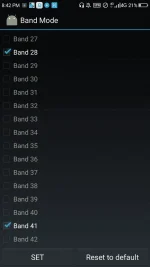
>go to bandmode and select which sim you're using for data connection
>check the band WCDMA-IMT-2000 only
>go back to engineering mode then select mobile data service preferred then check at mobile data full speed
> change your APN(kung meron ka)
¤ GLOBE
Apn: internet.globe.com.ph
Apn type: default,supl
Server: You do not have permission to view the full content of this post. Log in or register now.
¤ TNT
Apn: rcomnet
Port: 80
>Turn on Airplane mode for five seconds then off.
>Turn on mobile data then check if you really have boosted your Internet connection.
Like and feedback para tumaas tayo haha.
Thanks..