 PH
PHCurrent Version: 3.4.3

Requires Android: Varies with device
Category: Photography
v3.4.3 update:
v3.4.3
Overview:
Install Pɪᴄsᴀʀᴛ – where everyone becomes a great artist!
Pɪᴄsᴀʀᴛ is a free, full-featured photo editor and art community.
Packed with more features than in many ρáíd apps, Pɪᴄsᴀʀᴛ has become one of the world’s most popular photo apps by wrapping the best of what desktop photo and image editing suites can offer in an amazingly intuitive and easy-to-use user interface. We’ve backed that up with the ability to connect and share your work with a global community of other artists.
IMPORTANTLY, Pɪᴄsᴀʀᴛ will never sell your images. Ever.
Pɪᴄsᴀʀᴛ’s free, full-featured toolkit includes:
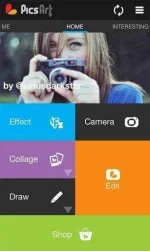
* Camera – enables you to take a picture and apply various effects by enhancing your standard camera.
* Picture Editor – Tons of photo manipulations, masks, collages, frames, borders, stickers, text effects, clipart graphics, callouts, crop, rotate, color adjust and more!
* Magic Effects – awesome artistic photo effects such as a stenciler, cartoonizer, sketcher, Orton, Lomo, vintage, cross process, HDR, fattal, pencil, Holgaart, watercolor, contours, comic, neon, gouache, old paper, pastel, red eye remover, Popart 2, smart blur, face fix, color splash, paper
and more!
* Draw – Many drawing effects including: draw, sticker mode, callouts, artistic brushes and text styles! Draw on your Facebook friend’s photos and share your artwork with the World! Advanced functionality includes layers and the ability to hide, rearrange order, or merge layers.
* Sharing – if you want to share your images (and in Pɪᴄsᴀʀᴛ you don’t have to), you can quickly share them with all major social networksor send photos by SMS and email.
* Live Wallpaper – enjoy amazingly funny color lines.
To learn more visit http://Pɪᴄsᴀʀᴛ.com and grab a look at the very best of the Pɪᴄsᴀʀᴛ network.
For a helpful comparison of Pɪᴄsᴀʀᴛ with other photo apps see this article: You do not have permission to view the full content of this post. Log in or register now.
Supported Languages – English, Japanese, German, Chinese, Polish, Korean, French, Spanish, Italian, Russian, Armenian
FAQ:
* How do I get custom fonts to work in Pɪᴄsᴀʀᴛ?
Check blog at You do not have permission to view the full content of this post. Log in or register now.
* I have problem with installing or updating Pɪᴄsᴀʀᴛ
Here are tips how fix install or download problem, read http://Pɪᴄsᴀʀᴛ.com/help
* Why can’t find “Color Splash” Effect in my phone?
Color Splash is supported starting from Android OS 2.1 and up.
* Where are old masks?
Due to increasing number of mask we put them in categories to see and switch between the categories use + (Plus) button near masks.
For any questions, problems or wishes please email us at support@Pɪᴄsᴀʀᴛ.com
Thank you for using Pɪᴄsᴀʀᴛ!
Tags:
photo, drawing, camera, photo editor, photo frame, collage, photo effects, photo editor
Requires Android: Varies with device
Category: Photography
v3.4.3 update:
v3.4.3
- Search for following / followers from Profile
- Improved landscape views
- Many fixes
- New “Monster” clip-arts
- Tablet issue fixed
- Corrected drag in collages
- Added Top/Recent tabs in active contests
- Other fixes
Overview:
Install Pɪᴄsᴀʀᴛ – where everyone becomes a great artist!
Pɪᴄsᴀʀᴛ is a free, full-featured photo editor and art community.
Packed with more features than in many ρáíd apps, Pɪᴄsᴀʀᴛ has become one of the world’s most popular photo apps by wrapping the best of what desktop photo and image editing suites can offer in an amazingly intuitive and easy-to-use user interface. We’ve backed that up with the ability to connect and share your work with a global community of other artists.
IMPORTANTLY, Pɪᴄsᴀʀᴛ will never sell your images. Ever.
Pɪᴄsᴀʀᴛ’s free, full-featured toolkit includes:
* Camera – enables you to take a picture and apply various effects by enhancing your standard camera.
* Picture Editor – Tons of photo manipulations, masks, collages, frames, borders, stickers, text effects, clipart graphics, callouts, crop, rotate, color adjust and more!
* Magic Effects – awesome artistic photo effects such as a stenciler, cartoonizer, sketcher, Orton, Lomo, vintage, cross process, HDR, fattal, pencil, Holgaart, watercolor, contours, comic, neon, gouache, old paper, pastel, red eye remover, Popart 2, smart blur, face fix, color splash, paper
and more!
* Draw – Many drawing effects including: draw, sticker mode, callouts, artistic brushes and text styles! Draw on your Facebook friend’s photos and share your artwork with the World! Advanced functionality includes layers and the ability to hide, rearrange order, or merge layers.
* Sharing – if you want to share your images (and in Pɪᴄsᴀʀᴛ you don’t have to), you can quickly share them with all major social networksor send photos by SMS and email.
* Live Wallpaper – enjoy amazingly funny color lines.
To learn more visit http://Pɪᴄsᴀʀᴛ.com and grab a look at the very best of the Pɪᴄsᴀʀᴛ network.
For a helpful comparison of Pɪᴄsᴀʀᴛ with other photo apps see this article: You do not have permission to view the full content of this post. Log in or register now.
Supported Languages – English, Japanese, German, Chinese, Polish, Korean, French, Spanish, Italian, Russian, Armenian
FAQ:
* How do I get custom fonts to work in Pɪᴄsᴀʀᴛ?
Check blog at You do not have permission to view the full content of this post. Log in or register now.
* I have problem with installing or updating Pɪᴄsᴀʀᴛ
Here are tips how fix install or download problem, read http://Pɪᴄsᴀʀᴛ.com/help
* Why can’t find “Color Splash” Effect in my phone?
Color Splash is supported starting from Android OS 2.1 and up.
* Where are old masks?
Due to increasing number of mask we put them in categories to see and switch between the categories use + (Plus) button near masks.
For any questions, problems or wishes please email us at support@Pɪᴄsᴀʀᴛ.com
Thank you for using Pɪᴄsᴀʀᴛ!
Tags:
photo, drawing, camera, photo editor, photo frame, collage, photo effects, photo editor
