 PH
PHMama mo Spy
Honorary Poster
https://phc.onl/#forbidden#/vdi8vvRphAo
First, before trying this check mo kung supported ang laptop mo
- go to cmd (command prompt) and type or just copy this "NETSH WLAN show drivers" press enter
- pag lumabas to you're good to go "Hosted network supported: Yes"
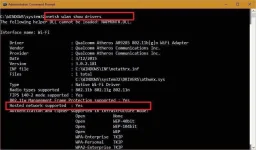
- if supported laptop mo proceed
*Search for CMD*
Open command prompt
Type NETSH WLAN set hostednetwork mode=allow ssid=pangalan ng wifi mo key=password mo
press enter
then type "netsh wlan start hostednetwork" in cmd again and press enter
"For additional steps watch the video guys kung paano yung vpn ang ma i hotspot"
guys panoorin nyo yung video mas madali maintindihan di kasi pwede mag embed ng youtube video eh
I'm open for questions
First, before trying this check mo kung supported ang laptop mo
- go to cmd (command prompt) and type or just copy this "NETSH WLAN show drivers" press enter
- pag lumabas to you're good to go "Hosted network supported: Yes"
- if supported laptop mo proceed
*Search for CMD*
Open command prompt
Type NETSH WLAN set hostednetwork mode=allow ssid=pangalan ng wifi mo key=password mo
press enter
then type "netsh wlan start hostednetwork" in cmd again and press enter
"For additional steps watch the video guys kung paano yung vpn ang ma i hotspot"
guys panoorin nyo yung video mas madali maintindihan di kasi pwede mag embed ng youtube video eh
I'm open for questions
 hanggang sa sharing lng ako tpos mag prpromt na an error occured " the dependencies failed to start