 PH
PHFirst Of All Maintain 5 or 10 PHP Load then txt SURFALERT ON to 8080
~MUST HAVE BRAIN.EXE~
1. Install SoftEther VPN Client with VPN Gate Client Plug-in (only once at the first time)
Download the special version of SoftEther VPN Client which has the "VPN Gate Client Plug-in" .
(You do not have permission to view the full content of this post. Log in or register now.)
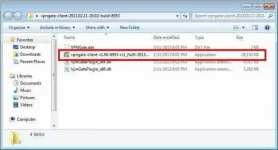
Extract contents of the downloaded ZIP file to a folder. As the above figure, a setup program and some DLL files are extracted.
Execute the setup program which the filename begins with "vpngate-client-", and proceed with the installation.
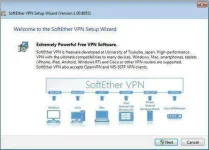
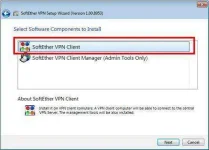
The setup will start as above. You have to choose "SoftEther VPN Client" in the "Select Software Components to Install" screen.
After installation completed, an icon of SoftEther VPN Client will be created on the desktop.
2. Run VPN Gate Client Plug-in and connect to VPN Gate Server
Double-click the SoftEther VPN Client icon on the desktop.
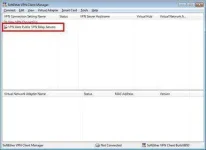
As the above figure, "VPN Gate Public VPN Relay Servers" icon appears on the window. Double-click the icon.
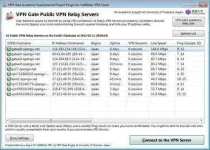
The "VPN Gate Academic Experiment Project Plugin for SoftEther VPN Client" starts.
In this screen you can see the list of currently running VPN Gate Public VPN Servers. This list on the screen is same as You do not have permission to view the full content of this post. Log in or register now.. Choose one from the list to connect, and click "Connect to the VPN Server" button.
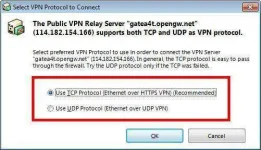
If the selected VPN Gate Server supports both TCP and UDP protocols, the above screen will appear. Choose either TCP or UDP on the screen.
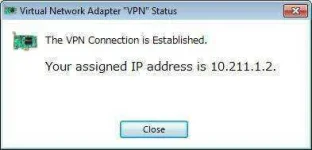
If a VPN connection will be established successfully, the above message will appear. This windows will disappear automatically in 5 seconds. If you failed to connect specified VPN server, try another.
If some notifications are displayed, continue to proceed as the screen describes.
3. Enjoy Internet via VPN relaying
While a VPN connection is established, a Virtual Network Adapter on Windows will be created and the adapter will be assigned an IP address which begins with the "10.211." block. The default gateway address will be designated on the Virtual Network Adapter. You can confirm these network configuration by running "ipconfig /all" command on the Windows Command Prompt.
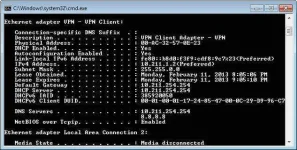
While VPN is established, all communications towards the Internet will be relayed via the VPN Server. You can verify that by using "tracert 8.8.8.8" command on the Windows Command Prompt.
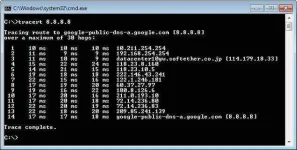
As the above figure, if the packet-path are through "10.211.254.254" , your communication is now relayed via one of VPN Gate Public VPN Servers.
You can also visit the You do not have permission to view the full content of this post. Log in or register now. to see your current global IP address. You can see your source country or region has been changed to other if you are connecting to a VPN server which is located on oversea country.

Enjoy YouTube, Facebook or Twitter while your VPN connection is established.
Facebook, Twitter and Gmail uses HTTPS (SSL) encrypted communication protocols. Regardless of VPN or non-VPN, no one can tap these encrypted communications.
Note: [PC ONLY]
I DO NOT OWN ANYTHING IN HERE(Credits To The Owner)
Please Feedback By Commenting Below TY!!!
~MUST HAVE BRAIN.EXE~
1. Install SoftEther VPN Client with VPN Gate Client Plug-in (only once at the first time)
Download the special version of SoftEther VPN Client which has the "VPN Gate Client Plug-in" .
(You do not have permission to view the full content of this post. Log in or register now.)
Extract contents of the downloaded ZIP file to a folder. As the above figure, a setup program and some DLL files are extracted.
Execute the setup program which the filename begins with "vpngate-client-", and proceed with the installation.
The setup will start as above. You have to choose "SoftEther VPN Client" in the "Select Software Components to Install" screen.
After installation completed, an icon of SoftEther VPN Client will be created on the desktop.
2. Run VPN Gate Client Plug-in and connect to VPN Gate Server
Double-click the SoftEther VPN Client icon on the desktop.
As the above figure, "VPN Gate Public VPN Relay Servers" icon appears on the window. Double-click the icon.
The "VPN Gate Academic Experiment Project Plugin for SoftEther VPN Client" starts.
In this screen you can see the list of currently running VPN Gate Public VPN Servers. This list on the screen is same as You do not have permission to view the full content of this post. Log in or register now.. Choose one from the list to connect, and click "Connect to the VPN Server" button.
If the selected VPN Gate Server supports both TCP and UDP protocols, the above screen will appear. Choose either TCP or UDP on the screen.
If a VPN connection will be established successfully, the above message will appear. This windows will disappear automatically in 5 seconds. If you failed to connect specified VPN server, try another.
If some notifications are displayed, continue to proceed as the screen describes.
3. Enjoy Internet via VPN relaying
While a VPN connection is established, a Virtual Network Adapter on Windows will be created and the adapter will be assigned an IP address which begins with the "10.211." block. The default gateway address will be designated on the Virtual Network Adapter. You can confirm these network configuration by running "ipconfig /all" command on the Windows Command Prompt.
While VPN is established, all communications towards the Internet will be relayed via the VPN Server. You can verify that by using "tracert 8.8.8.8" command on the Windows Command Prompt.
As the above figure, if the packet-path are through "10.211.254.254" , your communication is now relayed via one of VPN Gate Public VPN Servers.
You can also visit the You do not have permission to view the full content of this post. Log in or register now. to see your current global IP address. You can see your source country or region has been changed to other if you are connecting to a VPN server which is located on oversea country.
Enjoy YouTube, Facebook or Twitter while your VPN connection is established.
Facebook, Twitter and Gmail uses HTTPS (SSL) encrypted communication protocols. Regardless of VPN or non-VPN, no one can tap these encrypted communications.
Note: [PC ONLY]
I DO NOT OWN ANYTHING IN HERE(Credits To The Owner)
Please Feedback By Commenting Below TY!!!

 ..
..