 PH
PH-
Welcome to PHCorner Forums! Sign up for free to unlock full access and exclusive privileges, including:
- Asking questions about computer and mobile issues
- Discovering internet tips for your mobile network and computer
You are using an out of date browser. It may not display this or other websites correctly.
You should upgrade or use an alternative browser.
You should upgrade or use an alternative browser.
Updated Everyday Live PROXIES for 500 internal server error ( HSS users )
- Thread starter Peterfunnn_15
- Start date
- Status
- Not open for further replies.
Peterfunnn_15
Enthusiast
salamat po sa pag reply....ano po gamit mo vpn pang smart thanks
oo nga idol..penge kame vpn mo pang smart.. hehe.. thanks... :worthy:
You do not have permission to view the full content of this post. Log in or register now.
Create nalang kayo ng acct. Credits kay sir sk8r431

please avoid sms styleahh..e di gumagana nga xa kasi bumilis ng konti ung pgbrowse ko knina eh.. thank you idol..
your d man..:worthy:
in posting..
christiancardel18
Enthusiast
78.159.102.167 port 8081
yan palagi kong ginagamit,, working sya as of now,, dito ako Legazpi City Albay, ewan sa location nyo kung gumagana to,,,
pano pala mag unblock ng smart sim?? 4 sims na na-block sakin,, hehe
yan palagi kong ginagamit,, working sya as of now,, dito ako Legazpi City Albay, ewan sa location nyo kung gumagana to,,,
pano pala mag unblock ng smart sim?? 4 sims na na-block sakin,, hehe
S
Salamat Boss ok na pala gumana na ulit ung freemynet gamit super config ni boss richardrrYou do not have permission to view the full content of this post. Log in or register now.
Create nalang kayo ng acct. Credits kay sir sk8r431
Peterfunnn_15
Enthusiast
78.159.102.167 port 8081
yan palagi kong ginagamit,, working sya as of now,, dito ako Legazpi City Albay, ewan sa location nyo kung gumagana to,,,
pano pala mag unblock ng smart sim?? 4 sims na na-block sakin,, hehe
Account Registration :
Punta ka dito You do not have permission to view the full content of this post. Log in or register now. > Gawa ka ng account ( free ) > Confirm mo sa email account mo > Pag registered kana sa site mag log-in kana ( You do not have permission to view the full content of this post. Log in or register now. ) > Kunin mo yung simcard mong blocked at alamin ang # nito > Lagay mo yung # sa "Add a new account" then click "Create" > Choose ICCD then hihingin yung ICCD # mo tignan mo dun sa likod ng simcard mo. 16 numbers yan then enter mo dun sa blank then click proceed ata yun haha > Once na nakalalink na yung # mo sa smart account mo, pwede mo na siyang imanage via web.
Unblocking tricks via deactivating International Roaming :
Punta ka dito You do not have permission to view the full content of this post. Log in or register now. then makikita mo yung no. mo na nilagay mo jan > then sa right side sa tapat ng no. mo click "Manage" ( pink button na lalabas pag tinapat mo yung cursor sa pinakagilid nung no na nilagay mo > After Clicking "Manage", click "Manage Services" after niyan lalabas sa baba ng "Manage Services" yung "Phone ad Sim" Button, click mo yun. > Click International Roaming > Click mo yung circle beside "Deactivate this Service" > magloloading ng konti yan pag tapos na mag loading click " PROCEED" > Dapat ganito ang lumabas after clicking "PROCEED"
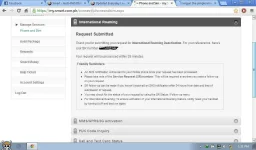
Pag iba kasi lumabas baka walang load yung sim or permanently blocked. "ROAM OFF CAPABLE" dapat. Pano malalaman? Text ROAM OFF to 333 pag ang reply niya ay ganito
Pwedeng iunblock yan via web. Goodluck.Prepaid roaming will be deactivated in a few minutes. Thank you for using our service.
Hero Arias
Leecher
thanks sa mga proxies, try ko mamya, cp mode ako now..
christiancardel18
Enthusiast
Account Registration :
Punta ka dito You do not have permission to view the full content of this post. Log in or register now. > Gawa ka ng account ( free ) > Confirm mo sa email account mo > Pag registered kana sa site mag log-in kana ( You do not have permission to view the full content of this post. Log in or register now. ) > Kunin mo yung simcard mong blocked at alamin ang # nito > Lagay mo yung # sa "Add a new account" then click "Create" > Choose ICCD then hihingin yung ICCD # mo tignan mo dun sa likod ng simcard mo. 16 numbers yan then enter mo dun sa blank then click proceed ata yun haha > Once na nakalalink na yung # mo sa smart account mo, pwede mo na siyang imanage via web.
Unblocking tricks via deactivating International Roaming :
Punta ka dito You do not have permission to view the full content of this post. Log in or register now. then makikita mo yung no. mo na nilagay mo jan > then sa right side sa tapat ng no. mo click "Manage" ( pink button na lalabas pag tinapat mo yung cursor sa pinakagilid nung no na nilagay mo > After Clicking "Manage", click "Manage Services" after niyan lalabas sa baba ng "Manage Services" yung "Phone ad Sim" Button, click mo yun. > Click International Roaming > Click mo yung circle beside "Deactivate this Service" > magloloading ng konti yan pag tapos na mag loading click " PROCEED" > Dapat ganito ang lumabas after clicking "PROCEED"
Pag iba kasi lumabas baka walang load yung sim or permanently blocked. "ROAM OFF CAPABLE" dapat. Pano malalaman? Text ROAM OFF to 333 pag ang reply niya ay ganito
Pwedeng iunblock yan via web. Goodluck.
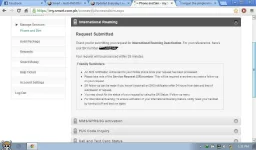
hindi man po ganyan lumabas,, after ko i-click yung proceed bumabalik sya sa home, may load naman ako,,
Peterfunnn_15
Enthusiast
hindi man po ganyan lumabas,, after ko i-click yung proceed bumabalik sya sa home, may load naman ako,,
Ulitin mo sa simula.
please avoid sms style
in posting..
Ok po, sorry i forgot.. by the way sorry dun sa mga postings ko about kay junn..
Peterfunnn_15
Enthusiast
May 6, 2013 PROXIES ADDED:
78.159.102.167 port 8081
86.110.18.101 port 3128
188.142.123.228 port 80
37.72.0.152 port 8080
Peterfunnn_15
Enthusiast
baka naman po sarili nyang discoveries yun. hehehe
anyway, try nyo din po ito mabilis din 80.255.145.41 port 3128. tagal ko na gamit to di pa pumapalya.
Check mo yung instructions niya sa instructions ko pati nga yung proxies parehas lang. Natameme siya ng binara ko. Guilty eh.
Peterfunnn_15
Enthusiast
Up ko lang baka may nangangailangan
kiel gallego
Grasshopper
Welcome sayo
Bakit sir? Mabagal po ba connection ng skybroadband? Kung oo, you can use this proxies
mabilis ang skybroadband pero di pa ako kuntento sa speed niya eh

batotskie22
Established
salamat po master dito. working po 100% keep it up
athanrave110
Leecher
Thank You... Works flawlessly... 
Peterfunnn_15
Enthusiast
mabilis ang skybroadband pero di pa ako kuntento sa speed niya eh
Upgrade upgrade din pag may time

salamat po master dito. working po 100% keep it up
Thank You... Works flawlessly...
salamat bro.working nga.
Welcome po. Enjoy niyo lang
- Status
- Not open for further replies.
About this Thread
-
126Replies
-
25KViews
-
36Participants
Last reply from:
Nokiauserz
Nokiauserz
New Topics
-
Globe ovpn for unlitiktok
- Started by dark0112
- Replies: 0
- 🚀 Freenet & Tunneling
-
Free Residential Proxy
- Started by Noztrebor
- Replies: 2
- 🚀 Freenet & Tunneling
-
Need vpn free internet
- Started by Bon26
- Replies: 0
- 🚀 Freenet & Tunneling
-
LPB PISO WIFI HELP
- Started by -shutdown-
- Replies: 5
- 🚀 Freenet & Tunneling
-
DNS LOOPING IN LINUX V2RAY TUN
- Started by Hidedeath
- Replies: 2
- 🚀 Freenet & Tunneling
-
MGa BOSS FREE VPN NA MAY PH SERVER PARA DITO SA AFRICA?
- Started by Junbiel 26
- Replies: 1
- 🚀 Freenet & Tunneling
-
PISOWIFI NO HULOG | (26-09-30) | NPV TUNNEL
- Started by Calcifeer
- Replies: 8
- 🚀 Freenet & Tunneling
-
[NOW WORKING] Youtube No Ads & Other Sites! via DNS
- Started by Lerps
- Replies: 41
- 🚀 Freenet & Tunneling
Trending Topics
-
Oct. 19, 2026 - GTM NoLoad | STS NoLoad | AllNet and AllCountry NoLoad | OpenCFG
- Noahclanman
Replies: 14 -
-
-
-
-
-
Online now
- Members online
- 689
- Guests online
- 7,793
- Total visitors
- 8,482