 PH
PHadasdaasd1212
Forum Veteran
Nahihirapan kabang gumawa ng maraming email tapos di nag accept ng temp mail ang gustong mong service ito na ang solution
====================
first login to your yahoo account |
====================
====================
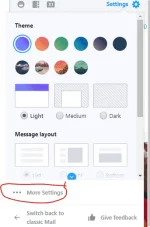
second go to settings

====================
====================
then go to "more settings"
====================
======================
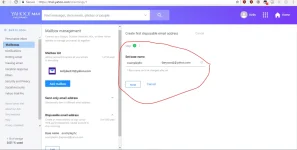
tapos pindutin mo yung "mailboxes"
tapos hanapin niyo yung "Disposable email address"

======================
====================
then makikita niyo sa right hand side
maglagay ka ng "base name"
(beware di mo na mapalitan ang base name )
====================
====================
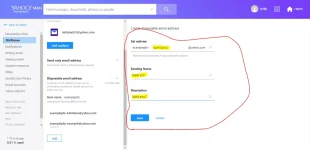
tapos lagay mo lagyan mo lang yung "keyword"
kahit ano lang ang ilagay mo
finally hit save
====================
====================
Kung gusto mo mag add ng disposable email punta ka dito:

====================
====================
pwede mo i delete yung email
pindutin mo yung email tapos makikita mo yung "Delete address"

====================
yun na yun ang ito kakalabasan ng email mo
[base name]-[keyword]@yahoo.com
pwede ka gumawa up to 500 emails
Pag ang yahoo mo naman ay classic punta ka nalang dito: You do not have permission to view the full content of this post. Log in or register now.
====================
first login to your yahoo account |
====================
====================
second go to settings
====================
====================
then go to "more settings"
====================
======================
tapos pindutin mo yung "mailboxes"
tapos hanapin niyo yung "Disposable email address"
======================
====================
then makikita niyo sa right hand side
maglagay ka ng "base name"
(beware di mo na mapalitan ang base name )
====================
====================
tapos lagay mo lagyan mo lang yung "keyword"
kahit ano lang ang ilagay mo
finally hit save
====================
====================
Kung gusto mo mag add ng disposable email punta ka dito:
====================
====================
pwede mo i delete yung email
pindutin mo yung email tapos makikita mo yung "Delete address"
====================
yun na yun ang ito kakalabasan ng email mo
[base name]-[keyword]@yahoo.com
pwede ka gumawa up to 500 emails
Pag ang yahoo mo naman ay classic punta ka nalang dito: You do not have permission to view the full content of this post. Log in or register now.

