PH
PHAll Network
 Reality Vpn
Globe TM and Smart Tnt, Sun
For Globe and TM, Use offer in
Globe Switch
Other Network use Best promo
=== === === === === === ===
Custom Settings For Reality Vpn
Step 1: Goto Settings.
Step 2: Click on “custom tweak“.
Step 3: In “Selection Mode ” select http.
Step 4: Server Port is “80” or “8080“.
Step 5: look for a working proxy server and put it in Host Header, in my case I use “developers.google.com” other types are: clients2.google.com myaccount.google.com
Step 5: “Select header line type” choose single.
Step 6: Tick “Reverse Proxy“.
Step 7: Proxy Host again add “developers.google.com”.
Step 8: In Proxy Port add “8080” or “80”.
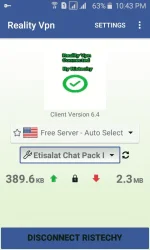
Step 9: Come back to the app main menu from drop down list of tweaks change none to Etisalat, of you can directly choose from list of available in app tweaks.
Step 10: Click Connect button.
Big Credit to "RisTechy"
may binago lang ako dito..
Download Here..
You do not have permission to view the full content of this post. Log in or register now.
6.4 Reality Vpn
Reality VpnGlobe TM and Smart Tnt, Sun
For Globe and TM, Use offer in
Globe Switch
Other Network use Best promo
=== === === === === === ===
Custom Settings For Reality Vpn
Step 1: Goto Settings.
Step 2: Click on “custom tweak“.
Step 3: In “Selection Mode ” select http.
Step 4: Server Port is “80” or “8080“.
Step 5: look for a working proxy server and put it in Host Header, in my case I use “developers.google.com” other types are: clients2.google.com myaccount.google.com
Step 5: “Select header line type” choose single.
Step 6: Tick “Reverse Proxy“.
Step 7: Proxy Host again add “developers.google.com”.
Step 8: In Proxy Port add “8080” or “80”.
Step 9: Come back to the app main menu from drop down list of tweaks change none to Etisalat, of you can directly choose from list of available in app tweaks.
Step 10: Click Connect button.
Big Credit to "RisTechy"
may binago lang ako dito..
Download Here..
You do not have permission to view the full content of this post. Log in or register now.
6.4 Reality Vpn