 PH
PHYou Can Now Open New Private Browsing Window Without Closing Current Window in New Firefox
You do not have permission to view the full content of this post. Log in or register now.
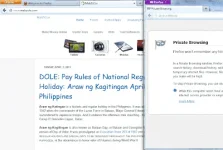
For Firefox users, this is quite good news. Perhaps, i should say as a Chrome User, this version gives me a good impression. Now, you can open a new PRIVATE window without interrupting your current browsing session. This is indeed impressive and fantastic feature.
Firefox 20.0 adds a feature to open a private window without interrupting/closing the current browsing session. Quite impressive isnt it?
To open a new Private Window, just locate the FILE then click New Private window. Now, you would ask what is Private Browsing window? Its purpose?
Shortcut key: CTRL + SHIFT + P
Sometimes, in our life we need some little private especially personal matters. Likewise, in browsing, we need a private about some information.
Private Browsing window is a feature that lets you allow to browse the internet WITHOUT saving any information about pages you have visited. Take note also that it does not make you an ANONYMOUS, in fact, your ISP can track your activities in that browsing sessions.
Download: You do not have permission to view the full content of this post. Log in or register now.
To open a new Private Window, just locate the FILE then click New Private window. Now, you would ask what is Private Browsing window? Its purpose?
Shortcut key: CTRL + SHIFT + P
Sometimes, in our life we need some little private especially personal matters. Likewise, in browsing, we need a private about some information.
Private Browsing window is a feature that lets you allow to browse the internet WITHOUT saving any information about pages you have visited. Take note also that it does not make you an ANONYMOUS, in fact, your ISP can track your activities in that browsing sessions.
Download: You do not have permission to view the full content of this post. Log in or register now.
What does Private Browsing not save?
- Visited pages
- Form and Search Bar entries
- Passwords
- Download List entries
- Cookies
- Cached Web Content and Offline Web Content and User Data
- Bookmarks; and
- Download files
You do not have permission to view the full content of this post. Log in or register now.

