🔒 Closed [aᴜᴛᴏsᴄʀɪᴘᴛ] ᴠᴘs & ᴏᴄs ᴘᴀɴᴇʟ ɪɴ ᴏɴᴇ! ᴛᴜᴛᴏʀɪᴀʟ ʙʏ cʟʀᴋᴢ

Status
Not open for further replies.
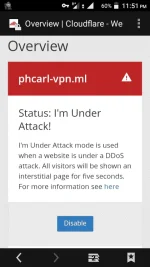
patingin nga cloudflare mo may titignan lang ako sa cloudflare setup mo at sa freenom setup mo
Screenshot_20180415-235118.webp
Screenshot_20180415-230959.png
Ayan bro. Yung :85 na kang talaga.hehe
 
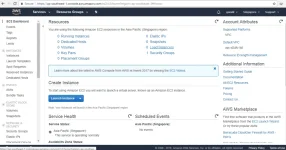
sa gumagawa ng droplet ngayon 206 pa rin ba na ip pinamimigay ? eto na nga muna pagtitripan ko haha xD ang AWS hehe

eto.webp


off mo muna ang cloudflare tapos on mo ulet then try mo sa incognito mode =)

or try directly sa incognito mode yung link ng panel mo
Parang minamalas yata ako ngayon ah?naiinis na ako,di na naman ma access yung site. Gumana na yun kanina eh,wala naman akong ibang ginalaw,bigla na lang nagdown
 
New code for ocs #4

#Remove unimportant

apt-get -y -f --purge remove samba*;
apt-get -y -f --purge remove apache2*;
apt-get -y -f --purge remove sendmail*;
apt-get -y -f --purge remove bind9*;

#Auto kick for debian

echo "* * * * * root /root/userlimit-debian.sh" >> /etc/crontab
echo "* * * * * root sleep 5; /root/userlimit-debian.sh" >> /etc/crontab
echo "* * * * * root sleep 10; /root/userlimit-debian.sh" >> /etc/crontab
echo "* * * * * root sleep 15; /root/userlimit-debian.sh" >> /etc/crontab
echo "* * * * * root sleep 20; /root/userlimit-debian.sh" >> /etc/crontab
echo "* * * * * root sleep 25; /root/userlimit-debian.sh" >> /etc/crontab
echo "* * * * * root sleep 30; /root/userlimit-debian.sh" >> /etc/crontab
echo "* * * * * root sleep 35; /root/userlimit-debian.sh" >> /etc/crontab
echo "* * * * * root sleep 40; /root/userlimit-debian.sh" >> /etc/crontab
echo "* * * * * root sleep 45; /root/userlimit-debian.sh" >> /etc/crontab
echo "* * * * * root sleep 50; /root/userlimit-debian.sh" >> /etc/crontab
echo "* * * * * root sleep 55; /root/userlimit-debian.sh" >> /etc/crontab

service cron restart
 
New code for ocs #4

#Remove unimportant

apt-get -y -f --purge remove samba*;
apt-get -y -f --purge remove apache2*;
apt-get -y -f --purge remove sendmail*;
apt-get -y -f --purge remove bind9*;

#Auto kick for debian

echo "* * * * * root /root/userlimit-debian.sh" >> /etc/crontab
echo "* * * * * root sleep 5; /root/userlimit-debian.sh" >> /etc/crontab
echo "* * * * * root sleep 10; /root/userlimit-debian.sh" >> /etc/crontab
echo "* * * * * root sleep 15; /root/userlimit-debian.sh" >> /etc/crontab
echo "* * * * * root sleep 20; /root/userlimit-debian.sh" >> /etc/crontab
echo "* * * * * root sleep 25; /root/userlimit-debian.sh" >> /etc/crontab
echo "* * * * * root sleep 30; /root/userlimit-debian.sh" >> /etc/crontab
echo "* * * * * root sleep 35; /root/userlimit-debian.sh" >> /etc/crontab
echo "* * * * * root sleep 40; /root/userlimit-debian.sh" >> /etc/crontab
echo "* * * * * root sleep 45; /root/userlimit-debian.sh" >> /etc/crontab
echo "* * * * * root sleep 50; /root/userlimit-debian.sh" >> /etc/crontab
echo "* * * * * root sleep 55; /root/userlimit-debian.sh" >> /etc/crontab
meron kang crontabs linux command for autokill?
 
nako di mo pwede ma rename yun tapos yun lang talaga kasi yun ang naka register sa kanya =) na try ko na kasi yan nag error din ako nyan! the best option dyan rebuild mo droplet mo tapos reg mo ulet ang ip ng droplet mo tapos wag mo na galawin yung sa terminal hayaan mo lang yun tapos gawin mo yung sinabi ko pag mag signup ka sa Database nya
upload_2018-4-15_9-34-30.webp

sir paano magamit to para pang net ko sa http injector?
 
New code for ocs #4

#Remove unimportant

apt-get -y -f --purge remove samba*;
apt-get -y -f --purge remove apache2*;
apt-get -y -f --purge remove sendmail*;
apt-get -y -f --purge remove bind9*;

#Auto kick for debian

echo "* * * * * root /root/userlimit-debian.sh" >> /etc/crontab
echo "* * * * * root sleep 5; /root/userlimit-debian.sh" >> /etc/crontab
echo "* * * * * root sleep 10; /root/userlimit-debian.sh" >> /etc/crontab
echo "* * * * * root sleep 15; /root/userlimit-debian.sh" >> /etc/crontab
echo "* * * * * root sleep 20; /root/userlimit-debian.sh" >> /etc/crontab
echo "* * * * * root sleep 25; /root/userlimit-debian.sh" >> /etc/crontab
echo "* * * * * root sleep 30; /root/userlimit-debian.sh" >> /etc/crontab
echo "* * * * * root sleep 35; /root/userlimit-debian.sh" >> /etc/crontab
echo "* * * * * root sleep 40; /root/userlimit-debian.sh" >> /etc/crontab
echo "* * * * * root sleep 45; /root/userlimit-debian.sh" >> /etc/crontab
echo "* * * * * root sleep 50; /root/userlimit-debian.sh" >> /etc/crontab
echo "* * * * * root sleep 55; /root/userlimit-debian.sh" >> /etc/crontab

service cron restart
yun maraming salamat 0:)
 
pano po to kapag gumagawa ako ng account sa ssh server na nilagay ko sa panel ganto lumalabas.
 

Attachments

  • Screenshot_2018-04-16-00-35-26-84.webp
    Screenshot_2018-04-16-00-35-26-84.webp
    14.9 KB · Views: 13
Status
Not open for further replies.

About this Thread

  • 6K
    Replies
  • 215K
    Views
  • 685
    Participants
Last reply from:
1achy

Trending Topics

Online now

Members online
435
Guests online
1,522
Total visitors
1,957

Forum statistics

Threads
2,271,644
Posts
28,937,030
Members
1,238,753
Latest member
GellaMono
Back
Top