🔒 Closed Help naman paps pano ba burahin itong "path too long"

Status
Not open for further replies.

jadex_666

Eternal Poster
binubura ko sya pero ganyan lumalabas, puro folder lang naman nasa loob pero ayaw mabura
tumingin nako sa youtube ng mga tutorial pano burahin kaso walang umubra nagawa ko naman ng tama.
meron pa sa youtube na run>cmd kaso halos lahat wa epek
pano kaya ang sagot sa problem nato? sana may makatulong :)
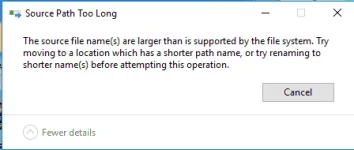
 

Attachments

  • path.webp
    path.webp
    10.6 KB · Views: 23
eto subok mo din repa

Solving “Too Long” Filename Errors
It is a simple three-step process to delete a file with a long filename. The trick is to auto-generate a shorter filename and use that.

  1. Open a command prompt in the directory where the file is located.
  2. Use a DOS command to get the short filename in the 8.3 filename format.
  3. Now, use the DEL command in DOS for the file to delete the file.
Let’s see how it works with an example. Here we have a file with a long filename in a directory.


Open File Explorer and browse to the file in its directory. Press Shift and then right-click on an empty area. Choose Open command window here. A Command Prompt window will open with the path set to the directory you’re in.

Open-Command-Prompt.jpg


Enter the DOS command for listing the files and folders in the current directory. The dir command is an internal command and is available on all Microsoft operating systems. The /X attribute displays the short names for non-8.3 filenames. You can also use DIR /X /P to pause and move from one screen to the next when there are too many files to examine.

The screenshot below shows you the text file we want to delete with the “modified” short filename.


Short-File-Name.jpg


So, you can see how we used DOS to “auto-generate” a shorter name for the file. Now, just use the simple DEL command on the short filename to remove the file. That’s it!

Delete.jpg

 
Status
Not open for further replies.

About this Thread

  • 6
    Replies
  • 230
    Views
  • 5
    Participants
Last reply from:
ChatsNaoe

Trending Topics

Online now

Members online
453
Guests online
942
Total visitors
1,395

Forum statistics

Threads
2,275,076
Posts
28,960,477
Members
1,233,572
Latest member
linaresgmarc
Back
Top