 PH
PHSTEPS:
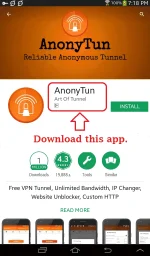
1) Download the latest version of Anonytun from the Google PlayStore or update it if you already have this app in your phone.
2) Register with one of these promos:
◆ Smart LTE prepaid sim
- SAKTO20 to 9999 (P20 for 2 days unlinet)
- SAKTO30 to 9999 (P30 for 3 days unlinet)
- AT60 to 9999 (P60 for 5 days unlinet)
- AllText10 sa suking SmartLoad retailer (P10/day unlinet)
◆ SMARTBro sim
- AT10 to 9999 (P10 for 1 day @ 2GB/day)
- AT60 to 9999 (P60 for 5 days @ 2GB/day)
◆ Talk 'N Text
- TP20 to 4545 (P20 for 2 days, up to 2GB/day). Extend this promo for additional 1 day, text EXTEND to 4545. Extend as many times as you want for only P5/extend.
- ALLOUT30 to 4545 (P30 for 2 days, 300MB + Unli FB)
- WHATS10 to 4545 (P10 for 3 days).
- IG10 to 4545 (P10 for 3 days).
- COC10 to 4545 (P10 for 3 days)
◆ Globe/TM
- Collect free data offers from GlobeSwitch app or register to any promo with data (MB) allocation like
- ASTIGFB10 to 8080 (P10 for 1 day, 100MB/day) - TM
- ASTIGFB15 to 8080 (P15 for 2 days, 100MB/day) - TM
- VIBER30 to 8080 (P30 for 5 days, 100MB/day) - Globe
- etc.
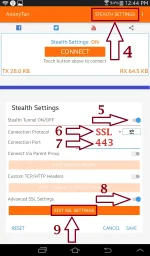
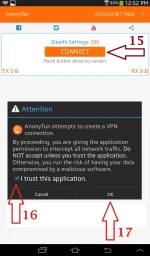
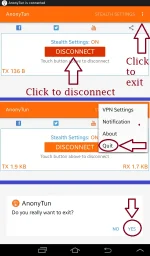
Tutorial 1) SSL Connection - Remote Proxy & Payload setup not required.
NOTE: For testing and demo purposes, the network & promo used on this tut is Talk'NText FB-based TP20 promo.
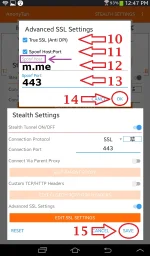
To use the app for other network, just change the Spoof Host with these:
- www.faceboo k.com or fbcdn.com (for Smart FB-based promos)
- You do not have permission to view the full content of this post. Log in or register now. (for SmartBRO FB-based promos)
- m.me (for Talk'NText FB-based promos)
- instagram.com (for Talk'NText IG10 promo)
- clients3.google.com (for Globe/TM promos with data allocation)
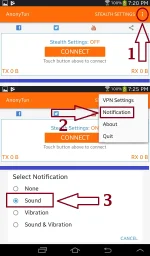
To setup Anonytun, just follow the instructions listed on each of the following pics.
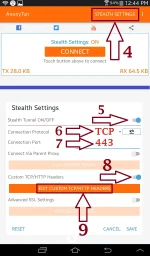
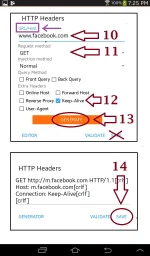
Tutorial 2) TCP Direct Connection - No Remote Proxy but Payload setup is required.
NOTE: For testing and demo purposes, the network & promo used on this tut is Smart Prepaid FB-based promo.
To setup Anonytun, just follow the instructions listed on each of the following pics.
You might need these tutorials:
KPN Tunnel Rrevolution direct SSL setup for all networks (no payload and remote proxy required)
https://phcorner.org/threads/508801
KPN Tunnel Revolution direct SSH setup (no remote proxy required)
https://phcorner.org/threads/500317
SVL Injector 4.2 for PC (supports SSL/TLS for no payload setup & no remote proxy connection)
https://phcorner.org/threads/505471/
No Remote Proxy config using "HTTP Net Header 4.2" for PC
https://phcorner.org/threads/500814/#post-8020671
1) Download the latest version of Anonytun from the Google PlayStore or update it if you already have this app in your phone.
2) Register with one of these promos:
◆ Smart LTE prepaid sim
- SAKTO20 to 9999 (P20 for 2 days unlinet)
- SAKTO30 to 9999 (P30 for 3 days unlinet)
- AT60 to 9999 (P60 for 5 days unlinet)
- AllText10 sa suking SmartLoad retailer (P10/day unlinet)
◆ SMARTBro sim
- AT10 to 9999 (P10 for 1 day @ 2GB/day)
- AT60 to 9999 (P60 for 5 days @ 2GB/day)
◆ Talk 'N Text
- TP20 to 4545 (P20 for 2 days, up to 2GB/day). Extend this promo for additional 1 day, text EXTEND to 4545. Extend as many times as you want for only P5/extend.
- ALLOUT30 to 4545 (P30 for 2 days, 300MB + Unli FB)
- WHATS10 to 4545 (P10 for 3 days).
- IG10 to 4545 (P10 for 3 days).
- COC10 to 4545 (P10 for 3 days)
◆ Globe/TM
- Collect free data offers from GlobeSwitch app or register to any promo with data (MB) allocation like
- ASTIGFB10 to 8080 (P10 for 1 day, 100MB/day) - TM
- ASTIGFB15 to 8080 (P15 for 2 days, 100MB/day) - TM
- VIBER30 to 8080 (P30 for 5 days, 100MB/day) - Globe
- etc.
Tutorial 1) SSL Connection - Remote Proxy & Payload setup not required.
NOTE: For testing and demo purposes, the network & promo used on this tut is Talk'NText FB-based TP20 promo.
To use the app for other network, just change the Spoof Host with these:
- www.faceboo k.com or fbcdn.com (for Smart FB-based promos)
- You do not have permission to view the full content of this post. Log in or register now. (for SmartBRO FB-based promos)
- m.me (for Talk'NText FB-based promos)
- instagram.com (for Talk'NText IG10 promo)
- clients3.google.com (for Globe/TM promos with data allocation)
To setup Anonytun, just follow the instructions listed on each of the following pics.
Tutorial 2) TCP Direct Connection - No Remote Proxy but Payload setup is required.
NOTE: For testing and demo purposes, the network & promo used on this tut is Smart Prepaid FB-based promo.
To setup Anonytun, just follow the instructions listed on each of the following pics.
You might need these tutorials:
KPN Tunnel Rrevolution direct SSL setup for all networks (no payload and remote proxy required)
https://phcorner.org/threads/508801
KPN Tunnel Revolution direct SSH setup (no remote proxy required)
https://phcorner.org/threads/500317
SVL Injector 4.2 for PC (supports SSL/TLS for no payload setup & no remote proxy connection)
https://phcorner.org/threads/505471/
No Remote Proxy config using "HTTP Net Header 4.2" for PC
https://phcorner.org/threads/500814/#post-8020671
