🔒 Closed Grammar checker please? [help]

Status
Not open for further replies.
#5) Free Grammarly premium account for Lifetime by Grammarly cookies
In this method you can use get grammarly premium account for free by use grammarly cookies code . If the above method not work then use this trick i sure you can get grammarly premium for free .also check You do not have permission to view the full content of this post. Log in or register now.

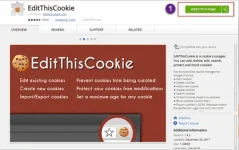
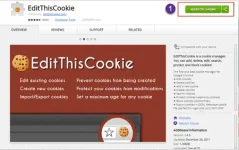
  • First download the You do not have permission to view the full content of this post. Log in or register now. extension on Google Chrome extension store and Add in to your Chrome Browser.
edit-this-cøøkíés.webp

  • Now , Visit grammarly cookies page and copy the all source code.
You do not have permission to view the full content of this post. Log in or register now.

You do not have permission to view the full content of this post. Log in or register now.

You do not have permission to view the full content of this post. Log in or register now.

You do not have permission to view the full content of this post. Log in or register now.


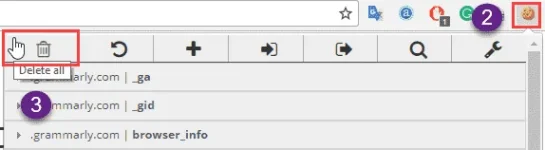
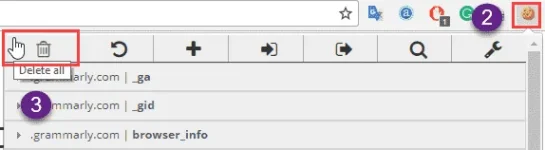
  • Next open You do not have permission to view the full content of this post. Log in or register now. official page and hit on edit this cookies icon ( Right Corner side).
  • From There you can see a Delete Icon at the first option. Click on it.
delete-grammarly-cøøkíés.webp

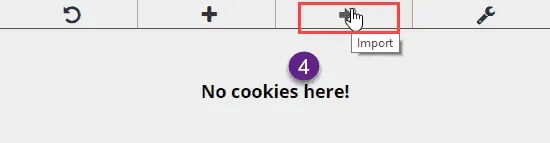
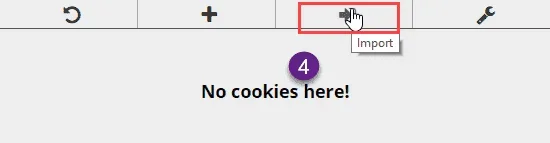
  • Next, You have to Click on the 3rd option Import [⇒] and Paste all the Cookies by simple type Ctrl+ V.
Grammarly-cøøkíés-import.webp

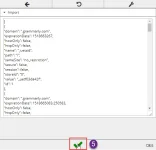
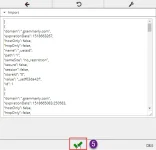
  • After Pasting the Cookie Script Click on Green Color Tick [√] option Like below screenshot .Grammarly-cøøkíés-add-complete.webp
  • Refresh the Grammarly page. That’s it Now you can Enjoy!
 
#5) Free Grammarly premium account for Lifetime by Grammarly cookies
In this method you can use get grammarly premium account for free by use grammarly cookies code . If the above method not work then use this trick i sure you can get grammarly premium for free .also check You do not have permission to view the full content of this post. Log in or register now.

  • First download the You do not have permission to view the full content of this post. Log in or register now. extension on Google Chrome extension store and Add in to your Chrome Browser.
edit-this-cøøkíés.webp

  • Now , Visit grammarly cookies page and copy the all source code.
You do not have permission to view the full content of this post. Log in or register now.

You do not have permission to view the full content of this post. Log in or register now.

You do not have permission to view the full content of this post. Log in or register now.

You do not have permission to view the full content of this post. Log in or register now.


  • Next open You do not have permission to view the full content of this post. Log in or register now. official page and hit on edit this cookies icon ( Right Corner side).
  • From There you can see a Delete Icon at the first option. Click on it.
delete-grammarly-cøøkíés.webp

  • Next, You have to Click on the 3rd option Import [⇒] and Paste all the Cookies by simple type Ctrl+ V.
Grammarly-cøøkíés-import.webp

  • After Pasting the Cookie Script Click on Green Color Tick [√] option Like below screenshot .Grammarly-cøøkíés-add-complete.webp
  • Refresh the Grammarly page. That’s it Now you can Enjoy!

maraming salamat po sa pag share idol
 
Status
Not open for further replies.

Similar threads

About this Thread

  • 9
    Replies
  • 430
    Views
  • 7
    Participants
Last reply from:
kosmasf

Trending Topics

Online now

Members online
504
Guests online
813
Total visitors
1,317

Forum statistics

Threads
2,275,107
Posts
28,960,677
Members
1,233,595
Latest member
slotherhouse
Back
Top