🔒 Closed Windows 10 wierd problem

Status
Not open for further replies.

PHC-Raldin

Forum Guru
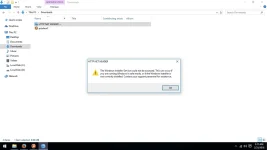
pati pa naman Windows Installer nagtatago na rin ? paano to i fix guys ?

upload_2018-2-25_3-17-58.webp
 
boss try mu munang ityoe ito sa cmd sfc /scannow / then try to download 𝐌𝐚𝐥𝐰𝐚𝐫𝐞𝐛𝐲𝐭𝐞𝐬 and scan for viruses and always update antivirus and windows 10
 
wala po akong mahanap na windows installer eh
Kung wala kang nakita.

Open cmd as a administrator. Then type this.
Code:
%windir%\system32\msiexec.exe /unregister
%windir%\system32\msiexec.exe /regserver
%windir%\syswow64\msiexec.exe /unregister
%windir%\syswow64\msiexec.exe /regserver

Kapag natyped mo na , reboot your pc.

Or

Open cmd as admin then type.

Code:
net start MSIServer
 
Kung wala kang nakita.

Open cmd as a administrator. Then type this.
Code:
%windir%\system32\msiexec.exe /unregister
%windir%\system32\msiexec.exe /regserver
%windir%\syswow64\msiexec.exe /unregister
%windir%\syswow64\msiexec.exe /regserver

Kapag natyped mo na , reboot your pc.

Or

Open cmd as admin then type.

Code:
net start MSIServer
try ko po , salamat po

feedback later
 
Status
Not open for further replies.

About this Thread

  • 6
    Replies
  • 297
    Views
  • 4
    Participants
Last reply from:
PHC-Raldin

Trending Topics

Online now

Members online
1,101
Guests online
833
Total visitors
1,934

Forum statistics

Threads
2,274,960
Posts
28,959,619
Members
1,233,494
Latest member
shaqqy
Back
Top