 PH
PHRequirements:
* Android Phone or Device with sim slot (3G/4G/LTE capable)
* You do not have permission to view the full content of this post. Log in or register now.
* Globe, TM, Smart, TNT and Sun sim (Default APN Settings)
* No load, No EHI required
* Luck (because connecting successfully is only a chance)
Procedure:
1. Download HTTP Injector for Android and have it installed to your phone.
2. Set your data connection to 3G, 4G or LTE.
3. Turn On your Mobile Data connection.
4. Open HTTP Injector.
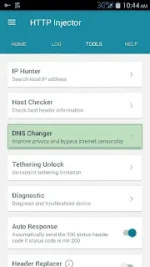
5. Tap the 'Tools'.
6. Tap the 'DNS Changer'. And you will notice two icons will appear on the top, a key and database with shield.
7. Done! That's it, very easy right. Try to browse now. If you are successfully connected to the internet, you're lucky, but if you're not, try to disconnect http injector and mobile data and try to reconnect. If reconnecting didn't still worked. Your last option is try the long way which is connecting your HTTP Injector with EHI.
Note:
This HTTP Injector No EHI is recommended only for internet browsing and Facebook surfing. This will not work for video streaming sites like YouTube, Vimeo, Dailymotion, Twitch and the like. And will also not work for online games. The chance of connecting successfully depends on location.
A simple like and feedback = ok na yun
* Android Phone or Device with sim slot (3G/4G/LTE capable)
* You do not have permission to view the full content of this post. Log in or register now.
* Globe, TM, Smart, TNT and Sun sim (Default APN Settings)
* No load, No EHI required
* Luck (because connecting successfully is only a chance)
Procedure:
1. Download HTTP Injector for Android and have it installed to your phone.
2. Set your data connection to 3G, 4G or LTE.
3. Turn On your Mobile Data connection.
4. Open HTTP Injector.
5. Tap the 'Tools'.
6. Tap the 'DNS Changer'. And you will notice two icons will appear on the top, a key and database with shield.
7. Done! That's it, very easy right. Try to browse now. If you are successfully connected to the internet, you're lucky, but if you're not, try to disconnect http injector and mobile data and try to reconnect. If reconnecting didn't still worked. Your last option is try the long way which is connecting your HTTP Injector with EHI.
Note:
This HTTP Injector No EHI is recommended only for internet browsing and Facebook surfing. This will not work for video streaming sites like YouTube, Vimeo, Dailymotion, Twitch and the like. And will also not work for online games. The chance of connecting successfully depends on location.
A simple like and feedback = ok na yun