PH
PHRonstoppable
Eternal Poster
Para sa mga Heavy user na katulad ko. at katulad ninyo makakatulong sa inyo ito. Alam ko mga nagpost na neto but natabunan na. Credit sa mga master natin dito na nauna nagpost ng ganito way. Tried and tested Ka-Phc . Ilang months ko na gamit.
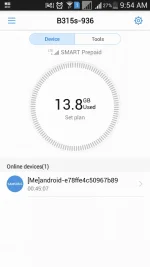
-Eto po ung mas mabilis na monitor ung data na coconsume at kung dapat naba mag Change ng Ip.
Kindly Download from playstore "Huawei Hilink" for mobile
Para hindi na kayo pumunta punta pa sa Gui ng modem .
My nabasa din po kasi ako thread na kung paano na Bina-block ni tramS ung mga sim natin. Once your sim are consume too much data. Then i try this way, tutal naka modem naman ako. and i use this kind of trick for how many months and My sim are never been blocked.
Sim : Smart LTE (Green) : 40 pesos lang sa mga tindahan and mall`s. Pag 50 benta sayo , Hanap ka sa iba or sa Mall 40 lang talaga
At60 user po ako . Good for 5days mahal kasi ng at10 samen 15-17pesos , Yumaman sana sila -_-
(at60 send 9999 or at10 send 9999)
My Location : Luzon
Supported ip of script tr0janz08.
You do not have permission to view the full content of this post. Log in or register now.. 1/html/home.html
You do not have permission to view the full content of this post. Log in or register now.. 1/html/home.html
You do not have permission to view the full content of this post. Log in or register now. 4/html/home.html
You are going to do is to change Ip every you consume 700-1gb data.
To change ip from your modem you need to install. View Screenshot for more information and clarification about in this tutorial
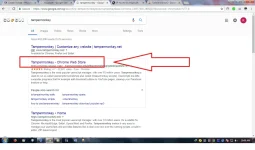
1. Search from google "tampermonkey"
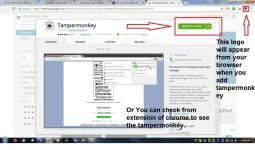
1.1 add to google chrome or any browser you use.
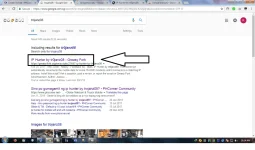
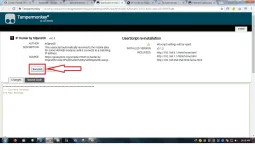
2. Search from google "trojanz08" Nakakatakot ung name. Pero laking na ng naitulong sakin neto hahaha"
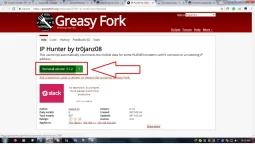
2.1 Install to google chrome or any browser you use.
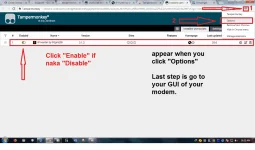
3. Go to tampermonkey "The icon of tampermonkey will display (Upper right of your browser) Right click"
3.1 Click "Options"
3.2 Tampermonkey dashboard will appear.
3.3 Click "Enable" if "IpHunter is Disable"
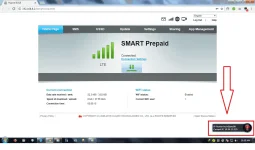
4. Go to Gui of you modem.
4.1 Click "Ip hunter" Lower right of your browser
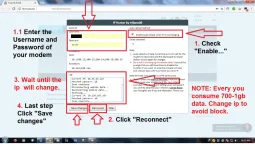
4.2 Check "Enable auto reboot when Ip is not changing"
4.2.1 Enter username and password of you modem.
4.2.2 Click "Reconnect"
4.2.3 Wait until the Ip will change
4.2.4 Last step , Click "Save Change"
Happy browsing , streaming and downloading Guyz
Hit like and follow , Thank you.
Note: Every you consume 700-1gb data, Change ip to avoid block. Click Screeshots for proof. Bali 2nd day pa lang ng "At60 promo" ko yung nasa screenshot i have 3 days left para mag pakasaya sa pagda`Download at pagsStreaming.
-Eto po ung mas mabilis na monitor ung data na coconsume at kung dapat naba mag Change ng Ip.
Kindly Download from playstore "Huawei Hilink" for mobile
Para hindi na kayo pumunta punta pa sa Gui ng modem .
My nabasa din po kasi ako thread na kung paano na Bina-block ni tramS ung mga sim natin. Once your sim are consume too much data. Then i try this way, tutal naka modem naman ako. and i use this kind of trick for how many months and My sim are never been blocked.
Sim : Smart LTE (Green) : 40 pesos lang sa mga tindahan and mall`s. Pag 50 benta sayo , Hanap ka sa iba or sa Mall 40 lang talaga
At60 user po ako . Good for 5days mahal kasi ng at10 samen 15-17pesos , Yumaman sana sila -_-
(at60 send 9999 or at10 send 9999)
My Location : Luzon
Supported ip of script tr0janz08.
You do not have permission to view the full content of this post. Log in or register now.. 1/html/home.html
You do not have permission to view the full content of this post. Log in or register now.. 1/html/home.html
You do not have permission to view the full content of this post. Log in or register now. 4/html/home.html
You are going to do is to change Ip every you consume 700-1gb data.
To change ip from your modem you need to install. View Screenshot for more information and clarification about in this tutorial
1. Search from google "tampermonkey"
1.1 add to google chrome or any browser you use.
2. Search from google "trojanz08" Nakakatakot ung name. Pero laking na ng naitulong sakin neto hahaha"
2.1 Install to google chrome or any browser you use.
3. Go to tampermonkey "The icon of tampermonkey will display (Upper right of your browser) Right click"
3.1 Click "Options"
3.2 Tampermonkey dashboard will appear.
3.3 Click "Enable" if "IpHunter is Disable"
4. Go to Gui of you modem.
4.1 Click "Ip hunter" Lower right of your browser
4.2 Check "Enable auto reboot when Ip is not changing"
4.2.1 Enter username and password of you modem.
4.2.2 Click "Reconnect"
4.2.3 Wait until the Ip will change
4.2.4 Last step , Click "Save Change"
Happy browsing , streaming and downloading Guyz
Hit like and follow , Thank you.
Note: Every you consume 700-1gb data, Change ip to avoid block. Click Screeshots for proof. Bali 2nd day pa lang ng "At60 promo" ko yung nasa screenshot i have 3 days left para mag pakasaya sa pagda`Download at pagsStreaming.