 PH
PHHow to Upgrade the Cache limit of JPAnime to unlimited
Requirements:
You do not have permission to view the full content of this post. Log in or register now.
You do not have permission to view the full content of this post. Log in or register now.
You do not have permission to view the full content of this post. Log in or register now.
Note:
Wag pansinin yung referral ID ko. Nakakatamad mag-edit at tsaka ang hirap pala gumawa ng Thread
Steps
1)Open Jpanime>Click Gear Icon(bottom left corner)
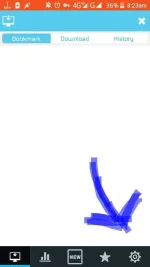
2)Click "Get Unlimit Download"
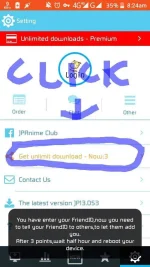
3)Copy Your Id ex. 19xxxx
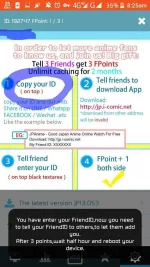
4)Open Parallel Space Lite then add the jp anime app
5)Open Jpanime sa Parallel Space tapos click uli yung gear icon
6)Click "Get Unlimit Download"
7)Paste mo yung ID referral mo tapos click mo yung parang eroplanong papel sa gilid
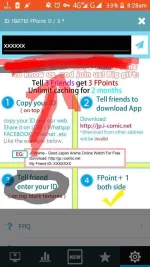
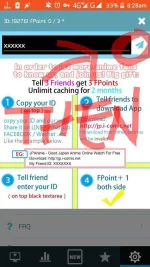
8)Clear Data mo yung parallel space lite at 64bit support
9)Ulitin mula sa Step 4 hanggang maka tatlong referral ka na
10)pag naka 3 referral ka na wait 1hour then reboot. Pagkatapos unli download na yung jpanime mo(yung default hindi yung nasa parallel space)
Yun lang po mga ka PHC kung may tanong kayo comment nyo lang subukan kong sagutin.
Requirements:
You do not have permission to view the full content of this post. Log in or register now.
You do not have permission to view the full content of this post. Log in or register now.
You do not have permission to view the full content of this post. Log in or register now.
Note:
Wag pansinin yung referral ID ko. Nakakatamad mag-edit at tsaka ang hirap pala gumawa ng Thread
Steps
1)Open Jpanime>Click Gear Icon(bottom left corner)
2)Click "Get Unlimit Download"
3)Copy Your Id ex. 19xxxx
4)Open Parallel Space Lite then add the jp anime app
5)Open Jpanime sa Parallel Space tapos click uli yung gear icon
6)Click "Get Unlimit Download"
7)Paste mo yung ID referral mo tapos click mo yung parang eroplanong papel sa gilid
8)Clear Data mo yung parallel space lite at 64bit support
9)Ulitin mula sa Step 4 hanggang maka tatlong referral ka na
10)pag naka 3 referral ka na wait 1hour then reboot. Pagkatapos unli download na yung jpanime mo(yung default hindi yung nasa parallel space)
Yun lang po mga ka PHC kung may tanong kayo comment nyo lang subukan kong sagutin.