 PH
PHHad this Problem TODAY and I had to GOOGLE / Ask some experts on Facebook Groups. Then Luckily, I found the Solution to my Problem.
Solution : Adding Plop To The Windows Boot Menu
BIOS version : 2010 and Below
Instructions :
1. Download Plop Boot ManagerYou do not have permission to view the full content of this post. Log in or register now.(check the file below), then extract it to a folder.
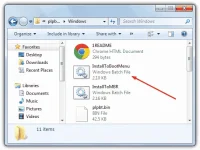
2. Navigate into the plpbt-[version]\Windows folder. Run the InstallToBootMenu.bat file. If you don’t have full admin rights already in Vista and 7, right click on the bat file and “Run as Administrator”.
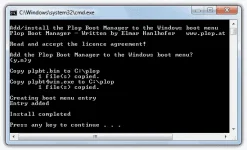
3. When asked if you want to continue, just press Y and enter. The necessary files will be coped and the boot entry added to the menu.
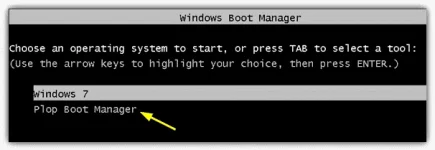
Now when you boot your computer, the Plop Boot Manager entry will be there and you can now select it and boot from a USB flash drive.
________________
Pag boot nyo. Eto makikita nyo :

NOTE : Ayaw ma attached ng file so upload ko nalang sa web.
You do not have permission to view the full content of this post. Log in or register now.
Solution : Adding Plop To The Windows Boot Menu
BIOS version : 2010 and Below
Instructions :
1. Download Plop Boot ManagerYou do not have permission to view the full content of this post. Log in or register now.(check the file below), then extract it to a folder.
2. Navigate into the plpbt-[version]\Windows folder. Run the InstallToBootMenu.bat file. If you don’t have full admin rights already in Vista and 7, right click on the bat file and “Run as Administrator”.
3. When asked if you want to continue, just press Y and enter. The necessary files will be coped and the boot entry added to the menu.
Now when you boot your computer, the Plop Boot Manager entry will be there and you can now select it and boot from a USB flash drive.
________________
Pag boot nyo. Eto makikita nyo :
Spoiler contents are visible only to Established Members.
NOTE : Ayaw ma attached ng file so upload ko nalang sa web.
You do not have permission to view the full content of this post. Log in or register now.
