 PH
PHPHC - JOSHIE
Forum Guru
Needed:
Http Injector (Latest Version)
Brain
Ehi Files ( Must be Editable) mas maganda kung kayo mismo gumawa ng ehi files.
How to make Ehi Files on Smart ?
https://phcorner.org/threads/487842/
1st Step:
Open Http Injector
2nd Step
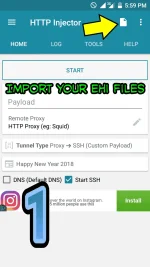
Import Your Ehi files or an Editable Ehi Files
3rd Step:
After importing. Go to Payload Generator
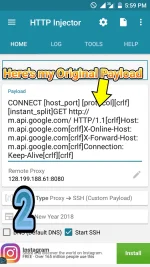
This is my Original Payload
CONNECT [host_port] [protocol][crlf][instant_split]GET You do not have permission to view the full content of this post. Log in or register now. HTTP/1.1[crlf]Host: m.api.google.com[crlf]X-Online-Host: m.api.google.com[crlf]X-Forward-Host: m.api.google.com[crlf]Connection: Keep-Alive[crlf][crlf]
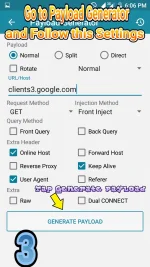
In Payload Generator Follow this settings:
Payload: Normal
Url: [ *********** Payload based]
clients3@google.com
Query Method: Get
Injection Method: Front Inject
Extra Header:
√Online Host
√Keep Alive
√User Urgent
Note: Settings Can be Seen in Photo Below
Tap "Generate Payload"
It should be look like this:
GET You do not have permission to view the full content of this post. Log in or register now. HTTP/1.1[crlf]Host: clients3.google.com[crlf]X-Online-Host: clients3.google.com[crlf]Connection: Keep-Alive[crlf]User-Agent: [ua][crlf][crlf]CONNECT [host_port] [protocol][crlf][crlf]
4th Step:
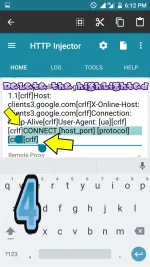
Diba May Nakikita kayong "Connect" before ng [crlf]. Simula sa " Connect" Delete nyo yun hanggang sa pinaka last part.
Ito magiging Result nun:
GET You do not have permission to view the full content of this post. Log in or register now. HTTP/1.1[crlf]Host: clients3.google.com[crlf]X-Online-Host: clients3.google.com[crlf]Connection: Keep-Alive[crlf]User-Agent: [ua][crlf][crlf]
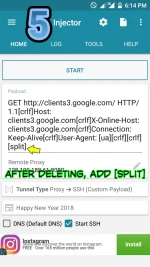
5th Step:
Sa dulo ng binura nyo Just Simply add
[split]
Like this:
GET You do not have permission to view the full content of this post. Log in or register now. HTTP/1.1[crlf]Host: clients3.google.com[crlf]X-Online-Host: clients3.google.com[crlf]Connection: Keep-Alive[crlf]User-Agent: [ua][crlf][crlf][split]
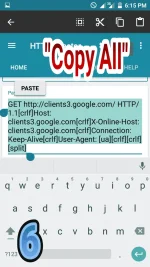
6th Step:
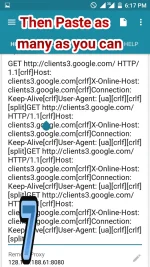
Copy nyo lahat yun then sa pinaka dulo ng part [split] paste nyo ng kahit ilang beses nyo gusto.
Like this:
GET You do not have permission to view the full content of this post. Log in or register now. HTTP/1.1[crlf]Host: clients3.google.com[crlf]X-Online-Host: clients3.google.com[crlf]Connection: Keep-Alive[crlf]User-Agent: [ua][crlf][crlf][split]GET You do not have permission to view the full content of this post. Log in or register now. HTTP/1.1[crlf]Host: clients3.google.com[crlf]X-Online-Host: clients3.google.com[crlf]Connection: Keep-Alive[crlf]User-Agent: [ua][crlf][crlf][split]GET You do not have permission to view the full content of this post. Log in or register now. HTTP/1.1[crlf]Host: clients3.google.com[crlf]X-Online-Host: clients3.google.com[crlf]Connection: Keep-Alive[crlf]User-Agent: [ua][crlf][crlf][split]GET You do not have permission to view the full content of this post. Log in or register now. HTTP/1.1[crlf]Host: clients3.google.com[crlf]X-Online-Host: clients3.google.com[crlf]Connection: Keep-Alive[crlf]User-Agent: [ua][crlf][crlf][split]
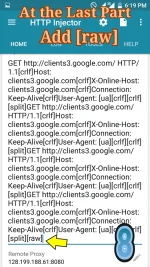
Last Step:
After nyo na ma paste, Just simply add sa dulo ng [raw]
Like this:
GET You do not have permission to view the full content of this post. Log in or register now. HTTP/1.1[crlf]Host: clients3.google.com[crlf]X-Online-Host: clients3.google.com[crlf]Connection: Keep-Alive[crlf]User-Agent: [ua][crlf][crlf][split]GET You do not have permission to view the full content of this post. Log in or register now. HTTP/1.1[crlf]Host: clients3.google.com[crlf]X-Online-Host: clients3.google.com[crlf]Connection: Keep-Alive[crlf]User-Agent: [ua][crlf][crlf][split]GET You do not have permission to view the full content of this post. Log in or register now. HTTP/1.1[crlf]Host: clients3.google.com[crlf]X-Online-Host: clients3.google.com[crlf]Connection: Keep-Alive[crlf]User-Agent: [ua][crlf][crlf][split]GET You do not have permission to view the full content of this post. Log in or register now. HTTP/1.1[crlf]Host: clients3.google.com[crlf]X-Online-Host: clients3.google.com[crlf]Connection: Keep-Alive[crlf]User-Agent: [ua][crlf][crlf][split][raw]
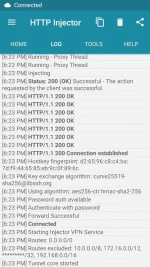
Then Tap the "Start"
That's it. Congratulations you successfuly made a Multi Status ^_^
Please Do feedback its make me Happy
PS: Sa mga naguguluhan po , kindly follow na lang yung attachment photo below, naka order na rin po yun para Hindi na po kayo maguluhan
Http Injector (Latest Version)
Brain
Ehi Files ( Must be Editable) mas maganda kung kayo mismo gumawa ng ehi files.
How to make Ehi Files on Smart ?
https://phcorner.org/threads/487842/
1st Step:
Open Http Injector
2nd Step
Import Your Ehi files or an Editable Ehi Files
3rd Step:
After importing. Go to Payload Generator
This is my Original Payload
CONNECT [host_port] [protocol][crlf][instant_split]GET You do not have permission to view the full content of this post. Log in or register now. HTTP/1.1[crlf]Host: m.api.google.com[crlf]X-Online-Host: m.api.google.com[crlf]X-Forward-Host: m.api.google.com[crlf]Connection: Keep-Alive[crlf][crlf]
In Payload Generator Follow this settings:
Payload: Normal
Url: [ *********** Payload based]
clients3@google.com
Query Method: Get
Injection Method: Front Inject
Extra Header:
√Online Host
√Keep Alive
√User Urgent
Note: Settings Can be Seen in Photo Below
Tap "Generate Payload"
It should be look like this:
GET You do not have permission to view the full content of this post. Log in or register now. HTTP/1.1[crlf]Host: clients3.google.com[crlf]X-Online-Host: clients3.google.com[crlf]Connection: Keep-Alive[crlf]User-Agent: [ua][crlf][crlf]CONNECT [host_port] [protocol][crlf][crlf]
4th Step:
Diba May Nakikita kayong "Connect" before ng [crlf]. Simula sa " Connect" Delete nyo yun hanggang sa pinaka last part.
Ito magiging Result nun:
GET You do not have permission to view the full content of this post. Log in or register now. HTTP/1.1[crlf]Host: clients3.google.com[crlf]X-Online-Host: clients3.google.com[crlf]Connection: Keep-Alive[crlf]User-Agent: [ua][crlf][crlf]
5th Step:
Sa dulo ng binura nyo Just Simply add
[split]
Like this:
GET You do not have permission to view the full content of this post. Log in or register now. HTTP/1.1[crlf]Host: clients3.google.com[crlf]X-Online-Host: clients3.google.com[crlf]Connection: Keep-Alive[crlf]User-Agent: [ua][crlf][crlf][split]
6th Step:
Copy nyo lahat yun then sa pinaka dulo ng part [split] paste nyo ng kahit ilang beses nyo gusto.
Like this:
GET You do not have permission to view the full content of this post. Log in or register now. HTTP/1.1[crlf]Host: clients3.google.com[crlf]X-Online-Host: clients3.google.com[crlf]Connection: Keep-Alive[crlf]User-Agent: [ua][crlf][crlf][split]GET You do not have permission to view the full content of this post. Log in or register now. HTTP/1.1[crlf]Host: clients3.google.com[crlf]X-Online-Host: clients3.google.com[crlf]Connection: Keep-Alive[crlf]User-Agent: [ua][crlf][crlf][split]GET You do not have permission to view the full content of this post. Log in or register now. HTTP/1.1[crlf]Host: clients3.google.com[crlf]X-Online-Host: clients3.google.com[crlf]Connection: Keep-Alive[crlf]User-Agent: [ua][crlf][crlf][split]GET You do not have permission to view the full content of this post. Log in or register now. HTTP/1.1[crlf]Host: clients3.google.com[crlf]X-Online-Host: clients3.google.com[crlf]Connection: Keep-Alive[crlf]User-Agent: [ua][crlf][crlf][split]
Last Step:
After nyo na ma paste, Just simply add sa dulo ng [raw]
Like this:
GET You do not have permission to view the full content of this post. Log in or register now. HTTP/1.1[crlf]Host: clients3.google.com[crlf]X-Online-Host: clients3.google.com[crlf]Connection: Keep-Alive[crlf]User-Agent: [ua][crlf][crlf][split]GET You do not have permission to view the full content of this post. Log in or register now. HTTP/1.1[crlf]Host: clients3.google.com[crlf]X-Online-Host: clients3.google.com[crlf]Connection: Keep-Alive[crlf]User-Agent: [ua][crlf][crlf][split]GET You do not have permission to view the full content of this post. Log in or register now. HTTP/1.1[crlf]Host: clients3.google.com[crlf]X-Online-Host: clients3.google.com[crlf]Connection: Keep-Alive[crlf]User-Agent: [ua][crlf][crlf][split]GET You do not have permission to view the full content of this post. Log in or register now. HTTP/1.1[crlf]Host: clients3.google.com[crlf]X-Online-Host: clients3.google.com[crlf]Connection: Keep-Alive[crlf]User-Agent: [ua][crlf][crlf][split][raw]
Then Tap the "Start"
That's it. Congratulations you successfuly made a Multi Status ^_^
Please Do feedback its make me Happy
PS: Sa mga naguguluhan po , kindly follow na lang yung attachment photo below, naka order na rin po yun para Hindi na po kayo maguluhan
Attachments
-
 1518431462-picsay.webp58.6 KB · Views: 39
 -
 1518431629-picsay.webp94.4 KB · Views: 29
 -
 1518431842-picsay.webp91.4 KB · Views: 29
 -
 1518431994-picsay.webp75.1 KB · Views: 30
 -
 1518432086-picsay.webp83.5 KB · Views: 26
 -
 1518432153-picsay.webp95.7 KB · Views: 28
 -
 1518432251-picsay.webp124.2 KB · Views: 26
 -
 1518432350-picsay.webp122.2 KB · Views: 31
 -
 Screenshot_2018-02-12-18-23-47.webp112 KB · Views: 31
 )
)