 PH
PH Status 200 (OK) connected
We try to make our ehi files status 200 But sometimes it is status 400,403,500 or even worst 503
There is a simple way to solve that problem
(Not at all time this solution works)
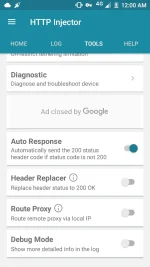
Procedure:
1) click tools
2) click Header Replacer Button
That's it! You're all done! Check if this worked please answer the poll you can change your answer anytime
Note: this doesn't work on all Ehi files
Kahit simpleng like lang
We try to make our ehi files status 200 But sometimes it is status 400,403,500 or even worst 503
There is a simple way to solve that problem
(Not at all time this solution works)
Procedure:
1) click tools
2) click Header Replacer Button
That's it! You're all done! Check if this worked please answer the poll you can change your answer anytime
Note: this doesn't work on all Ehi files
Kahit simpleng like lang

