 PH
PHJudgement999
Honorary Poster
Mga boss pa tulong nman sa error nwala bigla wifi at mobile hotspot sa laptop ko.. salamat po sa papansin
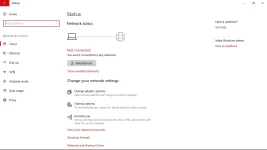
enabled na po pero d parin bumalik wifiBaka na-off mo yung wifi mo or nadisable wifi adapter.

na'try mo na itroubleshoot ?enabled na po pero d parin bumalik wifi
yes na try ko na. ni rereset lang niya ung network. pagtapos nang restart ganun pa rinna'try mo na itroubleshoot ?
may pinag end process ako sa takman boss. sa next restart ko nwala na wifiano po ba last mo ginawa bago nagkaganyan?
eto sundin mo, di ko na lang pag di pa ubra papsOr just do this command
Go to command prompt (cmd) then run as administrator si cmd then type this command.
ipconfig/flushdns

Or just do this command
Go to command prompt (cmd) then run as administrator si cmd then type this command.
ipconfig/flushdns
na try ko na kanina paps. nag reset winsock din ako ayaw parineto sundin mo, di ko na lang pag di pa ubra paps
nawala ung wifi at mobile hotspot sa settings pati sa taskbar..my dsl paps wifiMobile ba source mo paps?
ngayon lang tlga nangyare to paps.. pgtapos ko pnag end process ung ibang programs knina sa taskman naasar kse ako daming nag auto update kaya nag lalag masyado.. Aspire Es 13 Acer pala paps..ahh, ngayon lang nagkaganyan? dati naman la ganito prob? model na laptop mo boss
Try mo nga to papsngayon lang tlga nangyare to paps.. pgtapos ko pnag end process ung ibang programs knina sa taskman naasar kse ako daming nag auto update kaya nag lalag masyado.. Aspire Es 13 Acer pala paps..