🔒 Closed Sino familiar sa magisk system less root!

Status
Not open for further replies.

PHC-mikasa

Fanatic
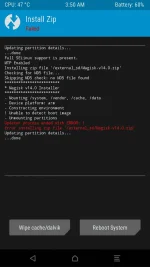
Mga ka phc sana may maka tulong saken dikase gumagana magisk saken TWRP 3.0.0 gamit ko eto lumalabas pag finaflash ko sana may maka tulong or makapag tut saken kung pano
Naka COLOR OS PO AKO na bobootloop kase sya pag kingroot or kingoroot gamet
 
ayaw talga saken paps hinahanapan ako ng boot img. cant unpack daw
 

Attachments

  • Screenshot_2018-02-02-03-50-11.webp
    Screenshot_2018-02-02-03-50-11.webp
    56.5 KB · Views: 17
ayaw talga saken paps hinahanapan ako ng boot img. cant unpack daw
Basahin mo official thread ni topjohnwu about sa installation ng magisk manager.

The best option is to flash stock firmware for you to clean up the boot.img problem. Do this if you can't find a way to flash your stock boot.img.

If you have the boot.img and you want to flash the boot.img by TWRP, then follow this step.
  1. Reboot into custom recovery.
  2. Click "Install" then choose "Image file."
  3. Browse where's the boot.img file is located. e.g.(/Internal/Download)
  4. Click on the boot.img file and choose boot and swipe to flash the img file.
  5. After successfully flashing the boot.img reboot into recovery by tappping the home button and click reboot and choose recovery.

*Important Notice*
You should have a backup file in case of emergency. Note that this method can cause bricked device if not followed correctly. Use it on your own risk.
 
Status
Not open for further replies.

Similar threads

About this Thread

  • 55
    Replies
  • 2K
    Views
  • 7
    Participants
Last reply from:
menin

Trending Topics

Online now

Members online
302
Guests online
1,012
Total visitors
1,314

Forum statistics

Threads
2,275,087
Posts
28,960,564
Members
1,233,588
Latest member
maikera97
Back
Top