 PH
PH1) Register with IG10 to 4545. (P10 for 3 days, 200MB/day)
2) Create a 1 month VPN account at You do not have permission to view the full content of this post. Log in or register now.
Host IP: 139.59.97.44
Host Port: 443
Username: sshd.host_sg0218
Password: 1234
Expiry date: 2018-02-18
3) I-download ang mga kakailanganing config files. Ang mga config files ay naka-compress into 1 file called ovpn-ios-android.rar. Ito'y may anim na config files
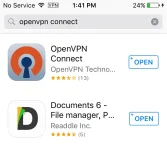
A) Goto AppStore and download OpenVPN Connect and Documents 6 apps.
B) Click this link to download the config:
Datafilehost: You do not have permission to view the full content of this post. Log in or register now. (updated)
Dropmb: You do not have permission to view the full content of this post. Log in or register now.
Just follow the instructions listed on each of the following pics:


Go back to STEP 4 to save the remaining configs.
IMPORTANT: Kung ayaw ma-import sa OpenVPN app, i-copy lang ang mga na-download na configs sa "iTunes Files" folder ng Documents app. Dun kayo mag-share.
NOTE: Ang mga nabanggit na config files ay pwede ring gamitin sa Android device at PC.
You might need this:
Smart HPI Tutorial for Fb/viber-based promos
https://phcorner.org/threads/482619/
Ready made HPI config with open ssh & remote proxy for Smart FB-based promos
https://phcorner.org/threads/481735/#post-7710747
2) Create a 1 month VPN account at You do not have permission to view the full content of this post. Log in or register now.
- Piliin ang "VPN Server Region List".
- Mag-register sa mga sumusunod na servers:
- Canada (183.197.174.170)
- Germany (139.59.148.124)
- India (139.59.70.95)
- Singapore 2 (139.59.97.44)
- USA (198.199.90.80)
- UK (46.101.91.207)
Host IP: 139.59.97.44
Host Port: 443
Username: sshd.host_sg0218
Password: 1234
Expiry date: 2018-02-18
3) I-download ang mga kakailanganing config files. Ang mga config files ay naka-compress into 1 file called ovpn-ios-android.rar. Ito'y may anim na config files
- ig-canada.ovpn
- ig-germany.ovpn
- ig-india.ovpn
- ig-singapore2
- ig-usa
- ig-uk
A) Goto AppStore and download OpenVPN Connect and Documents 6 apps.
B) Click this link to download the config:
Datafilehost: You do not have permission to view the full content of this post. Log in or register now. (updated)
Dropmb: You do not have permission to view the full content of this post. Log in or register now.
Just follow the instructions listed on each of the following pics:
Go back to STEP 4 to save the remaining configs.
IMPORTANT: Kung ayaw ma-import sa OpenVPN app, i-copy lang ang mga na-download na configs sa "iTunes Files" folder ng Documents app. Dun kayo mag-share.
NOTE: Ang mga nabanggit na config files ay pwede ring gamitin sa Android device at PC.
You might need this:
Smart HPI Tutorial for Fb/viber-based promos
https://phcorner.org/threads/482619/
Ready made HPI config with open ssh & remote proxy for Smart FB-based promos
https://phcorner.org/threads/481735/#post-7710747