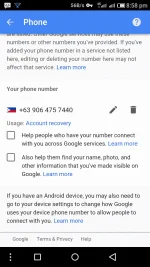
Eto try mo po
Set up a recovery phone number or email address
To make sure you can get back into your Google Account if you ever can’t sign in, add recovery information.
How recovery info helps you
A recovery phone number or email address helps you reset your password if:
- You forget your password
- Someone else is using your account
- You’re locked out of your account for another reason
Add or change a recovery phone number
- Sign in to your You do not have permission to view the full content of this post.
Log in or register now..
- From here, you can:
- Add a recovery phone.
- Change your recovery phone: Next to your number, select Edit .
- Delete your recovery phone: Next to your number, select Delete .
- Follow the instructions.
Note: Deleting your recovery phone number doesn’t delete it from being used for other Google services. Go to your account to
You do not have permission to view the full content of this post.
Log in or register now..
Which number to use
Use a mobile phone that:
- Gets text messages
- Belongs only to you
- You use regularly and keep with you
Add or change a recovery email address
- Sign in to your You do not have permission to view the full content of this post.
Log in or register now..
- From here, you can:
- Add a recovery email.
- Change or delete your recovery email: Next to your email, select Edit .
- Follow the instructions.
Which email to use
Choose an email address that:
- You use regularly
- Is different from the one you use to sign in to your Google Account
How recovery info is used
Recovery info helps you get back into your account and helps keep your account secure.
 PH
PH