 PH
PHAmazing as it is, it’s unfortunate that many people don’t know about this feature yet it comes in handy. Especially for those who don’t like to open so many windows and comb through multiple options to tweak something or do whatever they need in settings and features. Nevertheless, God Mode is here to help you out. If you enable this amazing feature in Windows, you can have all control panel settings and shortcuts in one folder and this makes it easier to manage everything. Fortunately, this God Mode feature works on windows version 7, 8 and also on the newest versions windows 10. In the next steps I will show you how you can enable God Mode on windows PC.
Basa Lang Maigi Para iwas tanong
Requirments:
Utak
Kamay
Laptop or Computer
Windows 7, 8 at 10
1st Create kayu new folder sa Desktop. ( dapat di nyu E rename, dapat new folder lang.)
2nd rename the folder (GodMode.{ED7BA470-8E54-465E-825C-99712043E01C})
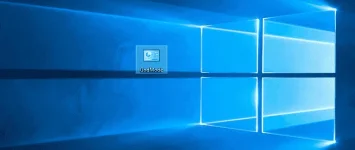
3rd Once natapos muna 2nd step hindi na magiging folder ung icon Na Gode Mode magiging ganito yan
at good to go kana!
may 270 settings at Options kana!
CTTO wala pa naamn akong nakita post na ganito sa PHC eh nabasa ko lang to sa ibang site, goodluck lang
Basa Lang Maigi Para iwas tanong
Requirments:
Utak
Kamay
Laptop or Computer
Windows 7, 8 at 10
1st Create kayu new folder sa Desktop. ( dapat di nyu E rename, dapat new folder lang.)
2nd rename the folder (GodMode.{ED7BA470-8E54-465E-825C-99712043E01C})
3rd Once natapos muna 2nd step hindi na magiging folder ung icon Na Gode Mode magiging ganito yan
at good to go kana!
may 270 settings at Options kana!
CTTO wala pa naamn akong nakita post na ganito sa PHC eh nabasa ko lang to sa ibang site, goodluck lang
 .. bili nalang ako ng External Keyboard.. Yung Touchpad nalang kasi nagana hehe ..SALAMAT ulit ng marami GodbleSs po