PH
PHWindows 10 Gamers edition Pro lite
Information
Performance: 10
Graphics: 10
Startup: 9
LINK: DOWNLOAD
TOOL LINK: You do not have permission to view the full content of this post. Log in or register now.
WINDOW RELOADER: You do not have permission to view the full content of this post. Log in or register now.
INSTALLATION
Non Grub: You do not have permission to view the full content of this post. Log in or register now.
5. Restart your computer
Information
- File size: 2.1 GB
- Offline installer/Standalone
- Last Release March 2, 2017
- 1 GB RAM
- 16GB Hard Disk Space
- Intel Pentium Processor or later
- No Music Player
- No Video Player (May Use Photo Viewer)
- Must update Microsoft .NET Framework 3.5
- NOT ACTIVATED
Performance: 10
Graphics: 10
Startup: 9
LINK: DOWNLOAD
TOOL LINK: You do not have permission to view the full content of this post. Log in or register now.
WINDOW RELOADER: You do not have permission to view the full content of this post. Log in or register now.
INSTALLATION
- Plugin your USB
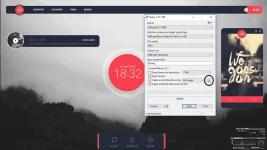
- Open Rufus
- Select Flash drive Device
- Create a bootable disk using [ISO]
- Refer here
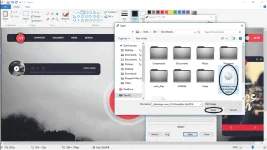
- Locate the ISO file
- Refer here
- Click Start
- Restart Your Computer
- Press F12 or F8 to boot to your Flash Drive (Depends on your Computer)
- Select your USB DEVICE by Pressing Arrow Up or Down
- Enter
- Install it
Non Grub: You do not have permission to view the full content of this post. Log in or register now.
- Burn Kali Linux
- Press F12 or F8 and boot your USB Device
- Choose Live
- Open Terminal and Type the following
Code:fdisk -l [*]Select SDA where you installed your Linux, change # and put the number sudo mount /dev/sda# /mnt [*]NEXT sudo mount --bind /dev /mnt/dev sudo mount --bind /proc /mnt/proc sudo mount --bind /sys /mnt/sys sudo chroot /mnt grub-install /dev/sda Press CTRL+D sudo umount /mnt/dev sudo umount /mnt/proc sudo umount /mnt/sys sudo umount /mnt
5. Restart your computer