 PH
PHDeCrypTor69
Forum Veteran
How to change Psiphon background into an image
Requirements:
1. Apk editor.
You do not have permission to view the full content of this post. Log in or register now.
Tutorial-How-to:
》Open Apk Editor and click “Select Apk from App” if psiphon is already install to your phone.If not,then click”Select Apk from File“.
》Follow this directory”res/layout/main.xml”.
》In the codes yoy will see a tag like this “<TabHost“.
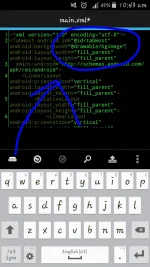
》Add this codes android:background=”@drawable/image name”
》After you add the codes,goto “res/drawable” and click any image or file then hold it for 2 seconds,A dialog will pop up,Click “Add a File” and find the image from your Sdcard .
Example:
emulated/0/sdcard/image.png
Hit save and install it.
Thanks
Salamats
Injoy
Requirements:
1. Apk editor.
You do not have permission to view the full content of this post. Log in or register now.
Tutorial-How-to:
》Open Apk Editor and click “Select Apk from App” if psiphon is already install to your phone.If not,then click”Select Apk from File“.
》Follow this directory”res/layout/main.xml”.
》In the codes yoy will see a tag like this “<TabHost“.
》Add this codes android:background=”@drawable/image name”
》After you add the codes,goto “res/drawable” and click any image or file then hold it for 2 seconds,A dialog will pop up,Click “Add a File” and find the image from your Sdcard .
Example:
emulated/0/sdcard/image.png
Hit save and install it.
Thanks
Salamats
Injoy
