 PH
PHMga ka PHC, copy paste lang to... paki delete na lang po if repost... just follow step-by-step instruction below:
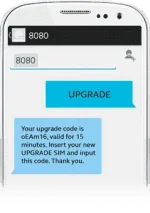
STEP 1: Using your old Prepaid SIM card, text UPGRADE to 8080. Remember to back up your SIM contacts and messages to your phone's internal or external memory.
STEP 2: Insert the new Globe Prepaid Upgrade SIM on your phone. The menu should appear within five (5) minutes—the delay may depend on your phone model.
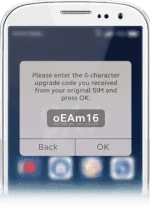
STEP 3: Enter the 6-digit upgrade code on the prompt, then press OK
STEP 4: After entering the upgrade code, restart your phone once prompted.
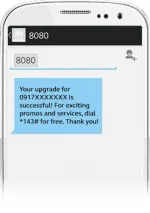
STEP 5: You'll receive this confirmation message once upgrade is successful.
-And your done! Sana makatulong to sa mga hindi pa nakaka alam. Enjoy!
STEP 1: Using your old Prepaid SIM card, text UPGRADE to 8080. Remember to back up your SIM contacts and messages to your phone's internal or external memory.
- Don't share the unique upgrade code to anybody.
- Memorize or take note of your upgrade code.
- Your upgrade code is only valid for fifteen (15) minutes.
STEP 2: Insert the new Globe Prepaid Upgrade SIM on your phone. The menu should appear within five (5) minutes—the delay may depend on your phone model.
STEP 3: Enter the 6-digit upgrade code on the prompt, then press OK
STEP 4: After entering the upgrade code, restart your phone once prompted.
STEP 5: You'll receive this confirmation message once upgrade is successful.
-And your done! Sana makatulong to sa mga hindi pa nakaka alam. Enjoy!
