 PH
PHDeCrypTor69
Forum Veteran
Best way to create your own personal apps..
In this methods,
You can create the following..
*Facebook page apps
*Facebook GroupS,Group Chat,Rooms..
*ÿôutubê Channel
*Sites
*Forums
*Blogspot and etc!!!
On your own apps no ads and any other site included!!just your personal apps!!!!
REQUIREMENTS :
1. Any Android phone.
2. Any browser like Chrome or uc browser (I recommend you to use Chrome browser).
3. Logo of your ÿôutubê channel or website, size 72×72 in png format.
4. APK Editor App instead on your phone.
STEP BY STEP TUTORIAL :
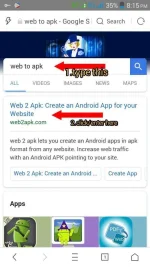
1. Buksan ang Brower on your phone. Then just go to Google then search mo itu:
Web to apk
and hit ok.
2. Now you will get first result on google just click on first post, then you will redirect in web to apk official website.
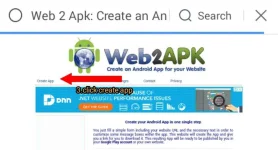
3. click on Create App option rom the top left corner.
4. Now your work is started from this page.
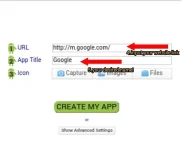
5. First enter your URL of your own personal ÿôutubê channel or your website.
6. Now enter title of your ÿôutubê channel or website.Kahit anung pangalan.
7. Now upload your logo image. If you will get any error then (wag mo nang lagyan,bahala na ang apk editor dyan)about the logo fix. Don't upload upload logo image.
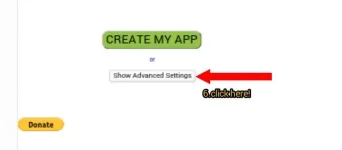
8. Now you will see an option called advanced settings just click on it.
9. Then you will an option called Screen oriantation. Just set it on vertical or horizontal view.
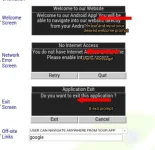
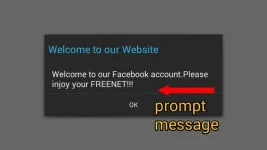
10, Now you will see some welcome note, internet access note and exit note, so if you want to change then change it sa gusto mong welcome prompt.otherwise leave it.
11. Now you will see last option google. So clear thus google text. Then click on create App.
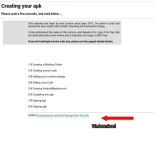
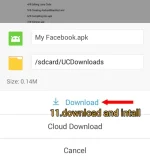
12. It will create your app in one click just download it and save it on your phone. Just install this app on your phone.
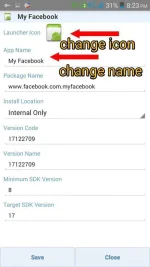
13. Now we need to change icon of the app. For that download apk editor app from the Google play store or if merun na kayu. And open it.
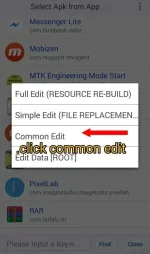
14. Now click on select apk from app, then select your installed app then click on Common Edit then just click on logo then change it with your own logo. Just save it.
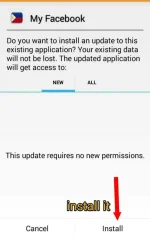
15. After that your app will rebuild. So just uninstall your old app from your phone.
16.Install it and your done!
Or if its get some error.Go to file manager /internal storage /apk editor folder then you will get your rebuild apk so install this app now. If you name is changed then just rename it.
Injoy lang mga tropapeps..
Hope you like it..
Hit like and follow nalang for more...
#Pahkihmoh
In this methods,
You can create the following..
*Facebook page apps
*Facebook GroupS,Group Chat,Rooms..
*ÿôutubê Channel
*Sites
*Forums
*Blogspot and etc!!!
On your own apps no ads and any other site included!!just your personal apps!!!!
REQUIREMENTS :
1. Any Android phone.
2. Any browser like Chrome or uc browser (I recommend you to use Chrome browser).
3. Logo of your ÿôutubê channel or website, size 72×72 in png format.
4. APK Editor App instead on your phone.
STEP BY STEP TUTORIAL :
1. Buksan ang Brower on your phone. Then just go to Google then search mo itu:
Web to apk
and hit ok.
2. Now you will get first result on google just click on first post, then you will redirect in web to apk official website.
3. click on Create App option rom the top left corner.
4. Now your work is started from this page.
5. First enter your URL of your own personal ÿôutubê channel or your website.
6. Now enter title of your ÿôutubê channel or website.Kahit anung pangalan.
7. Now upload your logo image. If you will get any error then (wag mo nang lagyan,bahala na ang apk editor dyan)about the logo fix. Don't upload upload logo image.
8. Now you will see an option called advanced settings just click on it.
9. Then you will an option called Screen oriantation. Just set it on vertical or horizontal view.
10, Now you will see some welcome note, internet access note and exit note, so if you want to change then change it sa gusto mong welcome prompt.otherwise leave it.
11. Now you will see last option google. So clear thus google text. Then click on create App.
12. It will create your app in one click just download it and save it on your phone. Just install this app on your phone.
13. Now we need to change icon of the app. For that download apk editor app from the Google play store or if merun na kayu. And open it.
14. Now click on select apk from app, then select your installed app then click on Common Edit then just click on logo then change it with your own logo. Just save it.
15. After that your app will rebuild. So just uninstall your old app from your phone.
16.Install it and your done!
Or if its get some error.Go to file manager /internal storage /apk editor folder then you will get your rebuild apk so install this app now. If you name is changed then just rename it.
Injoy lang mga tropapeps..
Hope you like it..
Hit like and follow nalang for more...
#Pahkihmoh
Attachments
-
 409433_20171227_203716.webp73 KB · Views: 20
 -
 409434_20171227_203953.webp59.7 KB · Views: 19
 -
 409435_20171227_204238.webp36.4 KB · Views: 23
 -
 409436_20171227_204410.webp12 KB · Views: 18
 -
 409438_20171227_204722.webp72.3 KB · Views: 18
 -
 409439_20171227_204917.webp53.4 KB · Views: 24
 -
 409440_20171227_205039.webp39.9 KB · Views: 19
 -
 409441_20171227_205225.webp58.1 KB · Views: 20
 -
 409442_20171227_205418.webp48.3 KB · Views: 19
 -
 409443_20171227_205546.webp46.9 KB · Views: 21
 -
 409444_20171227_205703.webp29.4 KB · Views: 18
 -
 409445_20171227_205826.webp114.4 KB · Views: 21
