PH
PHI. How to get cookies.
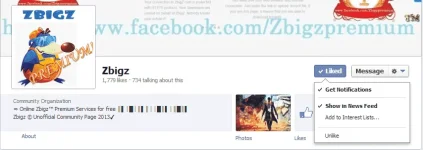
1. First, Like this facebook page -->> You do not have permission to view the full content of this post. Log in or register now.(kung saan makikita ang cookies)
2. Hintayin niyo lang na mag update o mag post sila sa kanilang timeline.
3. Ganito ang kanilang post (check the picture)
View attachment 833
4. Just Copy yung naka highlight of the above picture dahil yan ang sinasabi kong cookies na ipino'post nila.
5. Usually yung cookies ay after ng arrow.
II. How to use cookies.
1. For Chrome user:
2. For Firefox user.
Note: Do not logout, otherwise the cookies will stop working. Instead, just close the tab or browser.
------->> Sarili kong screen shot ito baka kasi wala maniwala
------->> Hit "Like" gumana sa inyo, kung hindi maghintay lamang hanggang mag post sila ng bagong cookies sa facebook page nila..kailangan palaging updated sa post nila..
------->> Yung Cookies ay temporary lang, hindi siya permanent kaya sulitin niyo kapag nagkaroon kayo..
1. First, Like this facebook page -->> You do not have permission to view the full content of this post. Log in or register now.(kung saan makikita ang cookies)
2. Hintayin niyo lang na mag update o mag post sila sa kanilang timeline.
3. Ganito ang kanilang post (check the picture)
View attachment 833
4. Just Copy yung naka highlight of the above picture dahil yan ang sinasabi kong cookies na ipino'post nila.
5. Usually yung cookies ay after ng arrow.
II. How to use cookies.
1. For Chrome user:
- Goto You do not have permission to view the full content of this post. Log in or register now. and add it to your browser.
- Goto You do not have permission to view the full content of this post. Log in or register now. (hindi kailangan nka register o naka login)
- If possible, dapat nasa tab kayo ng ZBIGZ.com!
- Click Cookie Manager icon in the upper right corner of your browser (Check the picture below).
- In the cookie manager, Locate "PHPSESSID" tab.
- Just Replace yung nka highlight nung cookies na nakuha ninyo sa facebook page na i'shinare ko..
- Click "Save".
- Then reload the page.
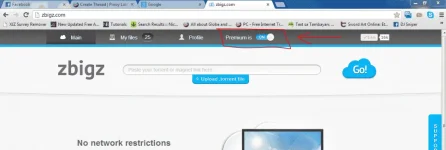
- After reloading, dapat naka ON na yung premium account gaya nito (Check the picture below)
- Kung hindi gumana hintay nalang ng bagong post na cookies.
- Dont forget to "Delete all Cookies" before replacing a new cookies to avoid error...
2. For Firefox user.
- Goto You do not have permission to view the full content of this post. Log in or register now. and add it to your firefox
- Goto You do not have permission to view the full content of this post. Log in or register now. (Hindi kailangan nka register o naka login).
- Then Goto Tools --> Cookie Manager+.
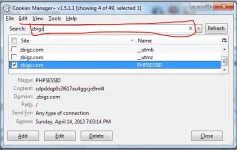
- In the search box type "zbigz" (check picture below).
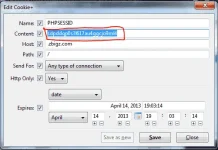
- Select cookie named with "PHPSESSID" and click on edit.yung naka highlight of the above picture.
- And replace the content with your cookies that you get in the facebook page na i'shinare ko
- Click "Save" and reload the page!
- Dapat naka ON na yung premium account..Enjoy Downloading..

Note: Do not logout, otherwise the cookies will stop working. Instead, just close the tab or browser.
------->> Sarili kong screen shot ito baka kasi wala maniwala
------->> Hit "Like" gumana sa inyo, kung hindi maghintay lamang hanggang mag post sila ng bagong cookies sa facebook page nila..kailangan palaging updated sa post nila..
------->> Yung Cookies ay temporary lang, hindi siya permanent kaya sulitin niyo kapag nagkaroon kayo..