 PH
PHDisclaimer: Ngayon lang po ako gagawa ng mejo mahabang tutorial so please stay with me.
Credits to our respective moderator/masters who have shared this amazing idea and tools. PesteM DiabolicaE SpecTro_MaXx owing777 and others.
Note: Since hindi ako gaano makahanap ng mejo matinong .hpi for our bugbog, I decided to make this tutorial at if na repost man po ito at kung may mga nalabang man akong rules dito, just in case, I do apologize.
Requirements (All) :
-PLC Tool You do not have permission to view the full content of this post. Log in or register now.
OVPN portable You do not have permission to view the full content of this post. Log in or register now.
Tara lets at umpisahan na naten!
For OVPN accounts (Try nyo sa mga gusto nyong vpn sites)
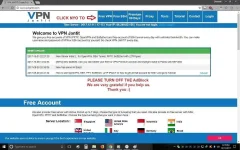
Una muna, gagawa tayo ng sarili nating free ovpn accounts, In this tutorial I choosed vpnjantit.

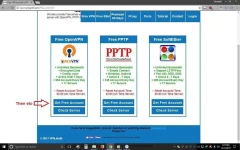
Next, Click nyo yung "Get Free Accounts"

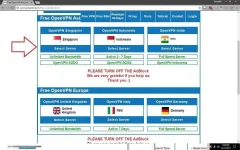
Next, Mamili kayo ng mga paborito nyong server, Syempre alam naman naten na si singapore ang mabilis diba? so choose it.

After nyo makagawa ng accounts jan. hanapin nyo yung proxy na para sa inyo at makikita nyo yun kalimitan sa SQUID PROXY tab.
I keep nyo yung information nyo (Username/Password) sa isang notepad. then after that we will proceed naman sa PLC tool.
PLC method:
Dito naman, kayo na ang bahala sa payload na gusto nyong maisip. sa case ko, nakita ko lang din dito yung payload so mag ala dora nalang muna kayo para makakita kayo ng working na payload.

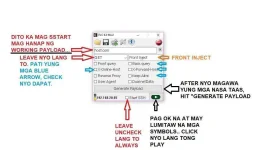
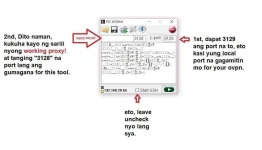
We will now generate a working payload, para magawa to tignan nyo yung sa picture, simplified instruction nalang. Basahin nyo nalang sya mabuti guys. Pag natapos nyan proceed next.

so sa OVPN portable naman:
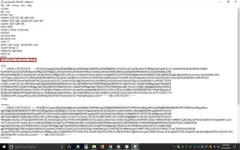
Simple lang sya, pagka download nyo ng config nyo, lagay nyo sa 'config' folder ng ovpn portable nyo then I add nyo lang tong lines na to...

After nyan. save, then connect nyo na. (Dipende sa inyo kung gusto nyo ng autologin method ng username password or manual nyo. To do this, put "yourdesirename.txt" sa gilid ng 'auth-user-pass' ng config nyo, I'm sure alam nyo naman po to right? hehe )
)
Then after nyan. connect nyo na. mag coconnect nyan.
NOTE: sa ibang vpn sites ayaw kumagat, ang working lang para saken is, vpnjantit, bestvpnssh at mytunneling.
Sa mga katanungan guys, baka hindi ko kayo masagot ha? syempre ako nag share lang din with the help of our superiors here para naman kahit papano eh may silbi ako dito, hahahaha! joke lang pero i do hope gumana to sa inyo. Sa disconnecting issue naman, bihira lang naman sya mangyare, lalo na pag down yung squid proxy ng site. to find another temporary proxy, dito kayo gogora besh ---> Squid-proxy.net
Oh sya?! pano guys, enjoyin' lang naten hangga't meron pa huh?!
Credits to our respective moderator/masters who have shared this amazing idea and tools. PesteM DiabolicaE SpecTro_MaXx owing777 and others.
Note: Since hindi ako gaano makahanap ng mejo matinong .hpi for our bugbog, I decided to make this tutorial at if na repost man po ito at kung may mga nalabang man akong rules dito, just in case, I do apologize.
Requirements (All) :
-PLC Tool You do not have permission to view the full content of this post. Log in or register now.
OVPN portable You do not have permission to view the full content of this post. Log in or register now.
Tara lets at umpisahan na naten!
For OVPN accounts (Try nyo sa mga gusto nyong vpn sites)
Una muna, gagawa tayo ng sarili nating free ovpn accounts, In this tutorial I choosed vpnjantit.
Next, Click nyo yung "Get Free Accounts"
Next, Mamili kayo ng mga paborito nyong server, Syempre alam naman naten na si singapore ang mabilis diba? so choose it.
After nyo makagawa ng accounts jan. hanapin nyo yung proxy na para sa inyo at makikita nyo yun kalimitan sa SQUID PROXY tab.
I keep nyo yung information nyo (Username/Password) sa isang notepad. then after that we will proceed naman sa PLC tool.
PLC method:
Dito naman, kayo na ang bahala sa payload na gusto nyong maisip. sa case ko, nakita ko lang din dito yung payload so mag ala dora nalang muna kayo para makakita kayo ng working na payload.
We will now generate a working payload, para magawa to tignan nyo yung sa picture, simplified instruction nalang. Basahin nyo nalang sya mabuti guys. Pag natapos nyan proceed next.
so sa OVPN portable naman:
Simple lang sya, pagka download nyo ng config nyo, lagay nyo sa 'config' folder ng ovpn portable nyo then I add nyo lang tong lines na to...
After nyan. save, then connect nyo na. (Dipende sa inyo kung gusto nyo ng autologin method ng username password or manual nyo. To do this, put "yourdesirename.txt" sa gilid ng 'auth-user-pass' ng config nyo, I'm sure alam nyo naman po to right? hehe
)Then after nyan. connect nyo na. mag coconnect nyan.
NOTE: sa ibang vpn sites ayaw kumagat, ang working lang para saken is, vpnjantit, bestvpnssh at mytunneling.
Sa mga katanungan guys, baka hindi ko kayo masagot ha? syempre ako nag share lang din with the help of our superiors here para naman kahit papano eh may silbi ako dito, hahahaha! joke lang
pero i do hope gumana to sa inyo. Sa disconnecting issue naman, bihira lang naman sya mangyare, lalo na pag down yung squid proxy ng site. to find another temporary proxy, dito kayo gogora besh ---> Squid-proxy.netOh sya?! pano guys, enjoyin' lang naten hangga't meron pa huh?!
 ) malakibg tulong to sa mga newbie
  haha thanks