 PH
PH"Pag bug ng matiwasay at di makanda kuba ang inyong mga daliri sa kaka pindot"
Disclaimer:
I am not responsible for damages of any kind,
Auto click po itong app so read the instruction carefully.
Needed:
Instructions:
Disclaimer:
I am not responsible for damages of any kind,
Auto click po itong app so read the instruction carefully.
Needed:
- Rooted Phones "only"
- Hicromacro App(avail. at Playstore)
Instructions:
- Pagkatapos mong maka register sa coc5 or coc25
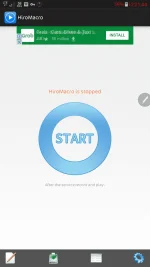
- Open ang Hicromacro app and press start
- Go to Gswitch app
- Click GS50 Promo
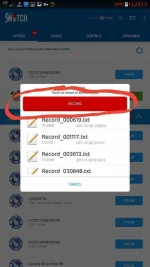
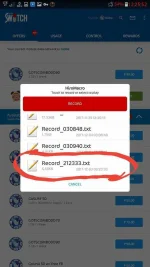
- Press Volume Down (may lalabas na pop-up menu and press Record)
- This time lahat ng na pre-press nyo sa recorded yan
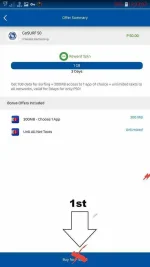
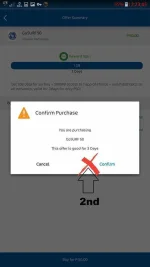
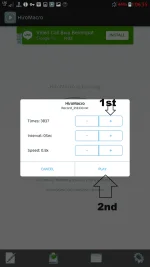
- Press ang "buy for P50" at "Confirm" (see 2 screenshot Pics)
- Regarding sa 2nd pic bakit po dyan, Para kahit anong lalabas na result Maprepress nya ang clickable area ng OK at Confirm
- Isang buy and confirm ok na yan
- Next is press volume down (the recording will stop)
- Press again the volume down (lalabas ulit ang pop-up menu)
- click ang "Record_xxxxxxxx.txt"
- Dapat damihan nyo ang times mga 4000 tas "Ok" at hayaan nyong naka bukas ang GSwitch
- Kung ayaw mu na press lang ulit ang Volume Down to stop executing the auto click
- Wag gawin ito kung matutulog ka. May mga roms kasi na madaling napapainit ang unit mo dahil sa app na ito. Parental Guidance is adviced hahaha