 PH
PHDecieJoy04
Leecher
Have you ever experience that your flash drive become a shortcut USB Flash Drive Icon?
or your USB Flash Drive files got missing or hidden?
If you do, you know that this is because of the virus infection in your USB flash drive. No worries, in this thread I will show you a possible solution to remove your USB Flash Drive from Shortcut Icon format and recover hidden files using Command Prompt (CMD).
~~~*~~~*~~~*~~~*~~~*~~~*~~~*~~~*~~~*~~~*~~~*~~~*~~~*~~~*~~~*
If your USB flash drive doesn’t have important files you can try to Format it...
STEPS ON HOW TO FORMAT YOUR USB FLASH DRIVE
Step 1. Click "Start" or "Windows" button, then look and select "My Computer".
Step 2. Under your Devices and Drives, Right Click the USB Flash Drive Icon that you wish to format, then select "Format...".
Step 3. Once a new widow shows up, you have an option to "Restore device defaults", then select "Start". Just wait the progress bar to finish and you are done.
... but if it contains important files then you are not going to format it, to Remove Shortcut Virus follow the Steps Below.
Step 1. Click "Start" or "Windows" button then look and select "cmd", as it appears in start menu Right Click on it and select "Run as Administrator"
Step 2. To find your USB flash drive letter open “My Computer” and check for letter.
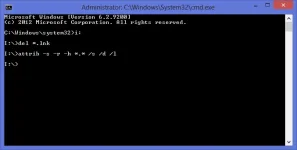
For example your USB flash drive is letter I, type I: in cmd and hit Enter on your Keyboard.
Step 3. Then type " del *.lnk " ( without the quotation marks ) in cmd window and hit Enter on your Keyboard.
Step 4. Then type " attrib -s -r -h *.* /s /d /l " ( without the quotation marks ) in cmd window and hit Enter on your Keyboard.
See the picture below.
~~~*~~~*~~~*~~~*~~~*~~~*~~~*~~~*~~~*~~~*~~~*~~~*~~~*~~~*~~~*
Hope this thread will help you remove the shortcut icon virus in your USB Flash Drive.
