 PH
PHdjdoolky76
Forum Master
Sa mga di pa makakonnek kay ponpon (No load or gswitch) eto lang ang ginawa ko para makakunnek, sana makatulong sa inyo!
Follow this steps:
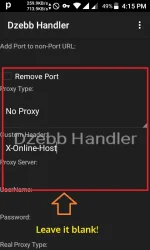
Open psiphon164 handler and go to settings
Add port to no port URL:
1080
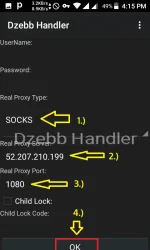
Real proxy type: SOCKS
-See image below
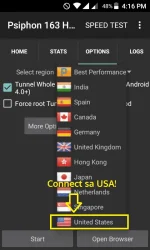
Connect to: USA Server
then press -->start to connect
At yun oh! connected agad sa pocket wifi na walang load or gswitch subscription
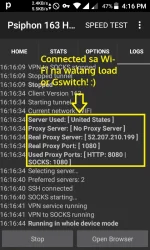
Connected din sa mobile data using TM LTE sim na walang load or gswitch subscription
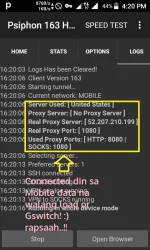
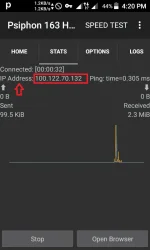
Eto proof ko!

Take note:
kung di na kayo makakonnect kay ponpon, palitan niyo lang ng Socks proxy
Eto pala ginagamit kong socks proxy sa site na ito: You do not have permission to view the full content of this post. Log in or register now.
Download Link:
Psiphon 163 Handler ==> You do not have permission to view the full content of this post. Log in or register now.
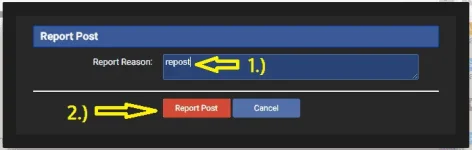
Sana gumana sa inyo! kung repost na ang trick nato, click report nalang para wala nang mapaasa!

Enjoy freenet mga papsi and advance merry christmas

Follow this steps:
Open psiphon164 handler and go to settings
Add port to no port URL:
1080
Real proxy type: SOCKS
-See image below
Connect to: USA Server
then press -->start to connect
At yun oh! connected agad sa pocket wifi na walang load or gswitch subscription
Connected din sa mobile data using TM LTE sim na walang load or gswitch subscription
Eto proof ko!
Take note:
kung di na kayo makakonnect kay ponpon, palitan niyo lang ng Socks proxy
Eto pala ginagamit kong socks proxy sa site na ito: You do not have permission to view the full content of this post. Log in or register now.
Download Link:
Psiphon 163 Handler ==> You do not have permission to view the full content of this post. Log in or register now.
Sana gumana sa inyo! kung repost na ang trick nato, click report nalang para wala nang mapaasa!
Enjoy freenet mga papsi and advance merry christmas