 PH
PHEcneralC1973
Forum Guru
PSN Tunnel v1.0 apk
About the app
-This app belongs to premiumssh.net,A famous SSH and V.P.N service provider
-The app will therefore not work for you if you have not subscribed to any of the package
-The software is FREE to test for your ISP but you will get Authentication Error
-For account purchase please see the contacts below
Importing the Config files
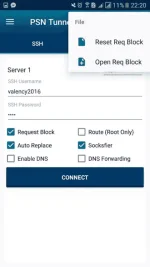
-Click the Menu settings>>>>File>>>>Reset Handler>>>>>Open Handler
-Pick the CFG file sent to you by your administrator or the cfg you have save for your personal use
-After importing then follow instructions for Connecting
Using SSH
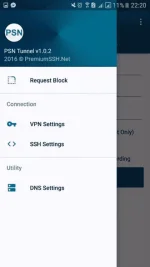
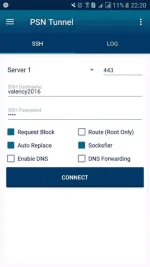
-Using the Navigational Drawer select SSH settings
-Fill your username and password
-Set the SSH port depending on your server/ISP
-Check HTTP handler
-Check Auto-Replace
-Check Socksfier(Optional but useful if your phone not rooted)
-DNS settings are optional and are to be used if you are connected but cannot browse
-Press the Connect Button
-Navigate to the Log Tab to confirm you are connected
Using V.P.N
-Using the Navigational Drawer select V.P.N settings
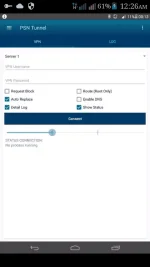
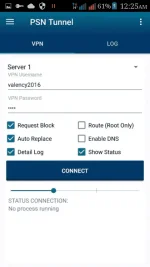
-Fill your username and password
-The HTTP handler and Auto-replace must be checked as in SSH above
-DNS settings are optional
Download link:
PSN Tunnel v1.0 apk
File URL:
You do not have permission to view the full content of this post. Log in or register now.


ecneralc1973 of phc
special thanks and credit to:
xXx-KuyaJ-xXx
About the app
-This app belongs to premiumssh.net,A famous SSH and V.P.N service provider
-The app will therefore not work for you if you have not subscribed to any of the package
-The software is FREE to test for your ISP but you will get Authentication Error
-For account purchase please see the contacts below
Importing the Config files
-Click the Menu settings>>>>File>>>>Reset Handler>>>>>Open Handler
-Pick the CFG file sent to you by your administrator or the cfg you have save for your personal use
-After importing then follow instructions for Connecting
Using SSH
-Using the Navigational Drawer select SSH settings
-Fill your username and password
-Set the SSH port depending on your server/ISP
-Check HTTP handler
-Check Auto-Replace
-Check Socksfier(Optional but useful if your phone not rooted)
-DNS settings are optional and are to be used if you are connected but cannot browse
-Press the Connect Button
-Navigate to the Log Tab to confirm you are connected
Using V.P.N
-Using the Navigational Drawer select V.P.N settings
-Fill your username and password
-The HTTP handler and Auto-replace must be checked as in SSH above
-DNS settings are optional
Download link:
PSN Tunnel v1.0 apk
File URL:
You do not have permission to view the full content of this post. Log in or register now.
ecneralc1973 of phc
special thanks and credit to:
xXx-KuyaJ-xXx