 PH
PHSa may gusto lang po.
Napansin ko kasi na mas mabilis at madaling comunnect ang nagagawa kong ehi gamit ang procedure nato.
Need mo muna net
Step 1: go to You do not have permission to view the full content of this post. Log in or register now.
Copy mo to
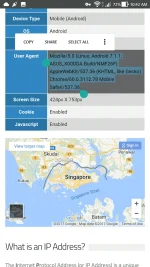
Lalabas dyan ang android version nyo at gamit nyo na browser
***try nyo sa different browser(uc,opera etc)
Step 2: paste mo sa nagenerate mong payload
Ex:
CONNECT [host_port]@127.0.0.1-127.0.0.2@opera.amazonaws.com [protocol][crlf][instant_split]GET You do not have permission to view the full content of this post. Log in or register now.opera.amazonaws.com/ HTTP/1.1[crlf]Host: 127.0.0.1-127.0.0.2@opera.amazonaws.com[crlf]Connection: Keep-Alive\r\nContent-Length: Mozilla/5.0 (Linux; Android 7.1.1; ASUS_X00DDA Build/NMF26F) AppleWebKit/537.36 (KHTML, like Gecko) Chrome/60.0.3112.78 Mobile Safari/537.36[crlf]Content-Length:999999999999[crlf][crlf]
pwede nyo subukan itong payload ko edit nyo na lang mga highlighted gamit ang sarili nyong user agent at ps.
Yun lang po
Nga pala credit kay StableNet dun sa unang part ng payload.
Feedback nalang kung working din sa inyo.
Edit: eto nga pala yung mga speedtest ko using this payload.
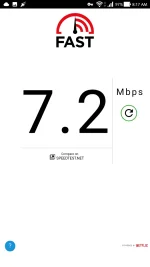
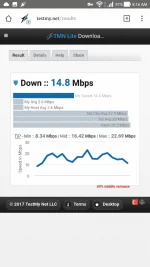
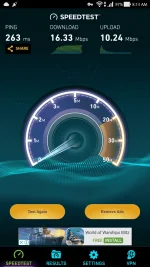
Napansin ko kasi na mas mabilis at madaling comunnect ang nagagawa kong ehi gamit ang procedure nato.
Need mo muna net
Step 1: go to You do not have permission to view the full content of this post. Log in or register now.
Copy mo to
Lalabas dyan ang android version nyo at gamit nyo na browser
***try nyo sa different browser(uc,opera etc)
Step 2: paste mo sa nagenerate mong payload
Ex:
CONNECT [host_port]@127.0.0.1-127.0.0.2@opera.amazonaws.com [protocol][crlf][instant_split]GET You do not have permission to view the full content of this post. Log in or register now.opera.amazonaws.com/ HTTP/1.1[crlf]Host: 127.0.0.1-127.0.0.2@opera.amazonaws.com[crlf]Connection: Keep-Alive\r\nContent-Length: Mozilla/5.0 (Linux; Android 7.1.1; ASUS_X00DDA Build/NMF26F) AppleWebKit/537.36 (KHTML, like Gecko) Chrome/60.0.3112.78 Mobile Safari/537.36[crlf]Content-Length:999999999999[crlf][crlf]
pwede nyo subukan itong payload ko edit nyo na lang mga highlighted gamit ang sarili nyong user agent at ps.
Yun lang po
Nga pala credit kay StableNet dun sa unang part ng payload.
Feedback nalang kung working din sa inyo.
Edit: eto nga pala yung mga speedtest ko using this payload.