 PH
PH-
Welcome to PHCorner Forums! Sign up for free to unlock full access and exclusive privileges, including:
- Asking questions about computer and mobile issues
- Discovering internet tips for your mobile network and computer
You are using an out of date browser. It may not display this or other websites correctly.
You should upgrade or use an alternative browser.
You should upgrade or use an alternative browser.
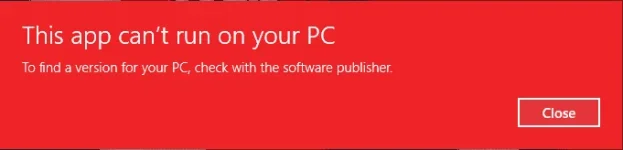
🔒 Closed This app can't run om your pc
- Thread starter delloCM_
- Start date
- Status
- Not open for further replies.
64 po ......................ano pc mo 32-bit ? 64-bit?
baka mismatch sa OS mo kebale 32-bit ang na install mo instead of 64-bit na yung nga(sabi mo)64 po ......................
hindi. diba sabe ko gumagana sya before ?baka mismatch sa OS mo kebale 32-bit ang na install mo instead of 64-bit na yung nga(sabi mo)
ah eh sorry can't further explain that (limitado lang isip ko jan) hehe try wipe that clean again and reinstall .hindi. diba sabe ko gumagana sya before ?
Shinsuke Nishizono
Wimpy Kid
disable smartscreen.
Search windows smartscreen sa search bar mo then open mo.
Click change setting and select do not do anything.
Search windows smartscreen sa search bar mo then open mo.
Click change setting and select do not do anything.
walang ganyan option sa windows 10 creators update PROdisable smartscreen.
Search windows smartscreen sa search bar mo then open mo.
Click change setting and select do not do anything.
Shinsuke Nishizono
Wimpy Kid
Or go to settings update and security.
Kung meron ka nito punta ka sa for developers. Then click ng developer mode.
Or run cmd in admin.
Then type
Then wait the process to finished. Kung meron nang report reboot mo na ng pc mo.
Kung meron ka nito punta ka sa for developers. Then click ng developer mode.
Or run cmd in admin.
Then type
Code:
sfc /scannowThen wait the process to finished. Kung meron nang report reboot mo na ng pc mo.
Shinsuke Nishizono
Wimpy Kid
Anong build number ng windows 10 mo? Paki naman po sa dxdiag. Sa Operating system. yung 15xxx mga ganun.walang ganyan option sa windows 10 creators update PRO
windows 10 proAnong build number ng windows 10 mo? Paki naman po sa dxdiag. Sa Operating system. yung 15xxx mga ganun.
version 1703
os build 15063.0
wala pa ...........okey na boss? natulongan kana ba?
para san to boss?Or go to settings update and security.
Kung meron ka nito punta ka sa for developers. Then click ng developer mode.
Or run cmd in admin.
Then type
Code:sfc /scannow
Then wait the process to finished. Kung meron nang report reboot mo na ng pc mo.
Shinsuke Nishizono
Wimpy Kid
para san to boss?
Fixes lang yan sa problem mo. Kung ayaw parin . Try mo mag system restore. Irevert back mo yung install mo kanina. Then install mo yung tamang version niya.
kung ayaw pa rin. Meron kasing report na buggy ng 15063 build ng windows 10. kaya nagupupdate na lang sila sa insidet update or downgrade na lang sila.
Source ng report :
You do not have permission to view the full content of this post. Log in or register now.
wala kong backup eh may auto restore point ba to?Fixes lang yan sa problem mo. Kung ayaw parin . Try mo mag system restore. Irevert back mo yung install mo kanina. Then install mo yung tamang version niya.
kung ayaw pa rin. Meron kasing report na buggy ng 15063 build ng windows 10. kaya nagupupdate na lang sila sa insidet update or downgrade na lang sila.
Source ng report :
You do not have permission to view the full content of this post. Log in or register now.
Shinsuke Nishizono
Wimpy Kid
Parang meron din. Check mo na lang.wala kong backup eh may auto restore point ba to?
- Status
- Not open for further replies.
About this Thread
-
17Replies
-
341Views
-
4Participants
Last reply from:
Shinsuke Nishizono
Shinsuke Nishizono
New Topics
-
Help how to download and install part file
- Started by ECLIPVEIL
- Replies: 1
- ❓ Computer Discussion & Support
-
Pc repair estimated price help
- Started by Anchora
- Replies: 7
- ❓ Computer Discussion & Support
-
Boot manager missing
- Started by Scare You
- Replies: 5
- ❓ Computer Discussion & Support
-
Patulong po. Windows Security
- Started by debbiepennin
- Replies: 3
- ❓ Computer Discussion & Support
-
SmartPLS pas source naman po
- Started by Unclear
- Replies: 0
- ❓ Computer Discussion & Support
-
Pc no device found
- Started by ashura12
- Replies: 1
- ❓ Computer Discussion & Support
-
INTERNATIONAL WEBINAR AND 2 LOCAL SEMINAR
- Started by PHC-JIA
- Replies: 0
- ❓ Computer Discussion & Support
-
Door Lock Keycard SDK
- Started by Porky Chao Fan
- Replies: 0
- ❓ Computer Discussion & Support
Trending Topics
Online now
- Members online
- 1,321
- Guests online
- 12,960
- Total visitors
- 14,281