🔒 Closed Tethering unlock

Status
Not open for further replies.

akosijovantot

Journeyman
Hi good eve sir maam. Ahm may tanong po ako tungkol sa sharing via hotspot gamit ang injector at GS.tapos napo ako mag root ng phone ko (lenovo a2010-a) tapos teher unlock success na po sya kaso d padin ma connect sa pc ang internet connection. Ano po dapat kung gawin salamat at god blessed.

Newbie here
 
Tutorial on how to enable Tether Connection on Http Injector:

  1. Your phone must be ROOTED or else it won't work.
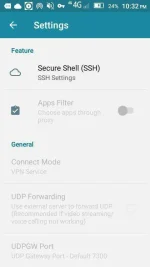
  2. Open "Http Injector" then proceed to "Settings". After clicking on Settings, disable (uncheck) "DNS Forwarding"option. *(your DNSmust be set on Google DNS)
  3. After doing so, go back to the main app and click the three (3) dotted option at the top right corner of your screen. After clicking it an option will popped out, then choose "Tether Connection".
  4. After clicking that, a notification will popped out on the bottom of your screen; click "Enable".
  5. After you clicked "Enable" you will be redirected into your "Hotspot Set-up". Turn on your wifi hotspot and set it up as you wish.
  6. Go back to "Http Injector" and "Start" your app.
  7. Finally, click the three (3) dotted menu again and choose "Tether Connection" again. A pop-up menu will be shown, but this time it will ask you if you want to Tether "Wi-Fi Hotspot" or so. Just choose "Wi-Fi Hotspot" and you're done.
  8. Go and connect your device and Enjoy!
I hope this could be a good help to you.:)
 
Tutorial on how to enable Tether Connection on Http Injector:

  1. Your phone must be ROOTED or else it won't work.
  2. Open "Http Injector" then proceed to "Settings". After clicking on Settings, disable (uncheck) "DNS Forwarding"option. *(your DNS must be set on Google DNS)
  3. After doing so, go back to the main app and click the three (3) dotted option at the top right corner of your screen. After clicking it an option will popped out, then choose "Tether Connection".
  4. After clicking that, a notification will popped out on the bottom of your screen; click "Enable".
  5. After you clicked "Enable" you will be redirected into your "Hotspot Set-up". Turn on your wifi hotspot and set it up as you wish.
  6. Go back to "Http Injector" and "Start" your app.
  7. Finally, click the three (3) dotted menu again and choose "Tether Connection" again. A pop-up menu will be shown, but this time it will ask you if you want to Tether "Wi-Fi Hotspot" or so. Just choose "Wi-Fi Hotspot" and you're done.
  8. Go and connect your device and Enjoy!
I hope this could be a good help to you.:)
Click this to see my tutorial with pictures :) Tether Tutorial for Http Injector:)
 
Sir -DirtyUnicorn- yung injector ko kasi auto setup na po lahat di na ako mka setting kasi yun nga po auto set up sya nag download lng ako ng file at auto set up na po sya.
 
Sir -DirtyUnicorn- yung injector ko kasi auto setup na po lahat di na ako mka setting kasi yun nga po auto set up sya nag download lng ako ng file at auto set up na po sya.
Baka config sinasabi mo sir? Di naman pwede i fix ang settings ng mismong application sir.:)
 
Naka-fixed ba mga settings na 'to?:)


376980_Screenshot_20171026-115308.png
 
Status
Not open for further replies.

About this Thread

  • 31
    Replies
  • 5K
    Views
  • 13
    Participants
Last reply from:
Black Zero

Online now

Members online
340
Guests online
1,193
Total visitors
1,533

Forum statistics

Threads
2,272,655
Posts
28,944,439
Members
1,237,325
Latest member
bsbdhshsb
Back
Top