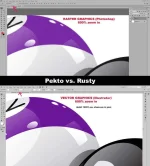
🔒 Closed Vector graphics vs. raster graphics

Status
Not open for further replies.

codyscott

Honorary Poster
***Vector***
(Adobe Illustrator, CorelDraw, SVG-Edit, Inkscape, Serif Drawplus, Sketch, Affinity, InDesign, etc.)

***Raster***
(Photoshop, GIMP, Pixlr, Paint, PicMonkey, etc.)

Para maging VERSATILE kang Graphic Designer, dapat marunong ka ng isang vector program at isang raster program. Pag-aralan ang KAKAYAHAN at ADVANTAGES ng isa't-isa.

Industry standard, at least alam mo ang....Illustrator AND/OR CorelDraw + Photoshop.

Industry standard (Desktop Publishing), at least alam ang.....Illustrator AND/OR CorelDraw + Photoshop + InDesign AND/OR QuakXpress

*****The future is friendly, keep learning!******
:)
 

Attachments

  • pekto-vs-rusty.webp
    pekto-vs-rusty.webp
    104.2 KB · Views: 44
PHC-Codex
Puwede ka na magtrabaho sa mga sign shops (or mga advertising companies).
O kaya puwede ka ng magtayo ng sign shop mo.

Dagdagan mo ng InDesign or QuarkXpress ang skill mo, puwede ka na sa mga publishing companies (newspaper companies, or kaya mga gumagawa ng babasahing magazines or mga books)
 
I thought you are going to tell us the difference of Vector and Raster. That vector is point-based, while raster is pixel-based. LMAO
 
hahahaha... relax.. why so edgy
i just want to show that one versus.... pixelated vs sharp pa rin at 600% zoom in.

f***k, I don't want to be boring and do a lot of explaining and typing.....too much work already... lol!
do not worry too much. they will get it. ok?...chill

i love you ;) jhnnlasnts
 
PHC-Codex
Puwede ka na magtrabaho sa mga sign shops (or mga advertising companies).
O kaya puwede ka ng magtayo ng sign shop mo.

Dagdagan mo ng InDesign or QuarkXpress ang skill mo, puwede ka na sa mga publishing companies (newspaper companies, or kaya mga gumagawa ng babasahing magazines or mga books)
San nkakapag download nyan bro. May mga crackfiles ba yan
 
Yung InDesign, Nagsu-subscribe ako sa Adobe Creative Cloud, bro. Pati Photoshop and Illustrator.
Student-teacher plan. Medyo mahal pero kailangan sa freeelancing ko.

Yung QuarkXpress, I think puwede mo pa yatang bilhin yan as stand-alone software. Pero mas gusto ko yung InDesign at nasanay na ako. QuarkXpress usually yan ang gamit ng mga malalaking publishing companies.

Search ka baka may mga trial versions. Test mo muna bago ka mag invest ng legit.
 
Yung InDesign, Nagsu-subscribe ako sa Adobe Creative Cloud, bro. Pati Photoshop and Illustrator.
Student-teacher plan. Medyo mahal pero kailangan sa freeelancing ko.

Yung QuarkXpress, I think puwede mo pa yatang bilhin yan as stand-alone software. Pero mas gusto ko yung InDesign at nasanay na ako. QuarkXpress usually yan ang gamit ng mga malalaking publishing companies.

Search ka baka may mga trial versions. Test mo muna bago ka mag invest ng legit.
salamat paps .hanap aq ng mga tutorial pagaralan ko
 
Pero kung gusto free software:
GIMP - substitute ng Photoshop (raster)
Inkscape - substitute ng Illustrator at CorelDraw (vector)
Scribus - substitute ng InDesign (dekstop publishing)

Lahat yan mga OpenSource. Alam ko yung GIMP at Inkscape, nasa professional level na mga capabilities na mga yan. Puwede na yan pang production.
Yung Scribus, bago bago ko pa lang yan naririnig at hindi ko pa nasusubukan. Try mo.

That's it. Downloadable lahat mga yan. FREE. It's just a matter of learning them, getting used to it at maging expert.
Makakagawa ka na ng mga professonal graphics.
 
Romneel
And to give you an idea of the file size difference:

5ft x 10ft na poster (na meron lang fill na kulay red)
- file size in AI vector = 1.54MB
- file size in Photoshop TIFF at 150dpi = 463MB
- file size in Photoshop JPG at 150dpi at MEDIUM QUALITY = 2.73MB

BUT keep in mind na hindi labanan ito ng paliitan ng file size or labanan ng sharpness ng graphics. Ito ay KNOWING when to use vector graphics (Illustrator) and when to use raster graphics (photoshop)....or...when to use both combined (in most cases, mas madaling gumawa ng mga shapes sa Illustrator and then i-copy and paste lang sa Photoshop para gamitin na mask or kung ano ano).
 
Romneel
And to give you an idea of the file size difference:

5ft x 10ft na poster (na meron lang fill na kulay red)
- file size in AI vector = 1.54MB
- file size in Photoshop TIFF at 150dpi = 463MB
- file size in Photoshop JPG at 150dpi at MEDIUM QUALITY = 2.73MB

BUT keep in mind na hindi labanan ito ng paliitan ng file size or labanan ng sharpness ng graphics. Ito ay KNOWING when to use vector graphics (Illustrator) and when to use raster graphics (photoshop)....or...when to use both combined (in most cases, mas madaling gumawa ng mga shapes sa Illustrator and then i-copy and paste lang sa Photoshop para gamitin na mask or kung ano ano).
Ahhh. ganun po pala..
Gumagawa po ba kayo vexel art papz?
 
saya naman dito SIMPLEHAN NATIN VECTOR = IMAGE CONTENT QUALITY depends on ilang layer sa layout itself ang laki ng file, line segment is for vector WHILE RASTER FILES uses pixel
 
In my own opinion kaya naman gawin lahat sa photoshop. kahit vector/vexel. mas madali gamitin ang photoshop at nanjan na yan lahat ng mga tools. pag aralan lang ng mabuti.
 
Status
Not open for further replies.

About this Thread

  • 19
    Replies
  • 728
    Views
  • 7
    Participants
Last reply from:
THE CHOSEN ONE

Online now

Members online
1,027
Guests online
1,099
Total visitors
2,126

Forum statistics

Threads
2,275,799
Posts
28,965,589
Members
1,231,936
Latest member
7afedz
Back
Top