 PH
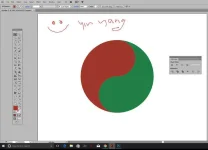
PHGagawa tayo ng yin yang shape.
Para sa mga pasmado ang mga kamay dyan na katulad ko, na hirap na hirap gumawa ng mga curves.
Gamitin natin ang POWER ng mga PRIMITIVE Shapes.
Let's use circle or elipse.
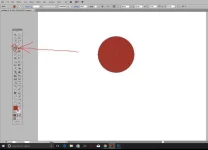
Step 1: Gawa ng elipse. Lagyan ng kulay. (see photo step1.jpg)
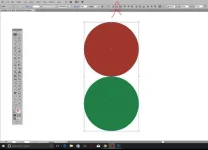
Step 2: Gawa ng isa pang elipse. Lagyan ng ibang kulay.
- tapos i-align silang dalawa. Use ALIGN tool (see photo step2.jpg)
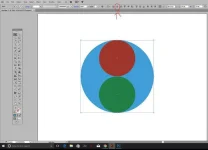
Step 3: Gawa ng isa pang elipse... pinaka malaki. Kagaya ng photo (step3.jpg) at Ilagay sa likod ng dalawang maliliit na elipses. ........tapos select mo lahat then click ALIGN tool again......(see photo step3.jpg).
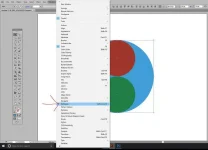
Step 4: With all elipses STILL SELECTED, go to menu WINDOW....PATHFINDER... (see photo step4.jpg)
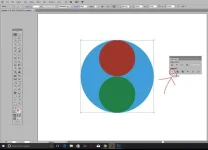
Step 5: Lalabas yung PATHFINDER window menu. Again, with ALL ELIPSES STILL SELECTED, you click "Divide" icon (as shown on photo step5.jpg).
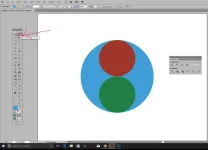
Step 6: Then on the toolbar, select DIRECT SELECT TOOL (as shown on step6.jpg)
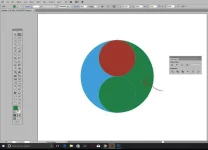
Step 7: Using Direct Select Tool, click mo yung tail portion (as shown step7.jpg). Then gawin mong kapareho ng kulay ng nasa babang elipse.
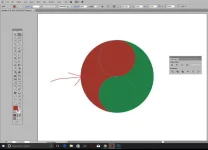
Step 8: Ganon din, using Direct Select Tool, click mo yung tail portion (as shown step8.jpg). Then gawin mong kapareho ng kulay ng nasa taas ng elipse.
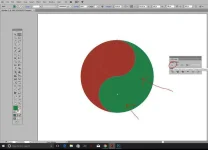
Step 9: Still using Direct Select Tool, select the elipse and the tail...and then click UNITE sa Pathfinder window (as shown on step9.jpg)
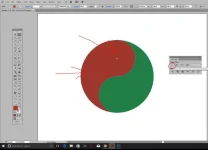
Step 10: Same, using Directo Select Tool, select the elipse and the tail ng kabila...then click UNITE sa Pathfinder window.
That's it. Ying Yang, baby!...lol
USE PRIMITIVE SHAPES....to create your shapes.... lalo na kung kagaya mo ako na hindi marunong mag drawing...
Hanggang sa muli!
Para sa mga pasmado ang mga kamay dyan na katulad ko, na hirap na hirap gumawa ng mga curves.
Gamitin natin ang POWER ng mga PRIMITIVE Shapes.
Let's use circle or elipse.
Step 1: Gawa ng elipse. Lagyan ng kulay. (see photo step1.jpg)
Step 2: Gawa ng isa pang elipse. Lagyan ng ibang kulay.
- tapos i-align silang dalawa. Use ALIGN tool (see photo step2.jpg)
Step 3: Gawa ng isa pang elipse... pinaka malaki. Kagaya ng photo (step3.jpg) at Ilagay sa likod ng dalawang maliliit na elipses. ........tapos select mo lahat then click ALIGN tool again......(see photo step3.jpg).
Step 4: With all elipses STILL SELECTED, go to menu WINDOW....PATHFINDER... (see photo step4.jpg)
Step 5: Lalabas yung PATHFINDER window menu. Again, with ALL ELIPSES STILL SELECTED, you click "Divide" icon (as shown on photo step5.jpg).
Step 6: Then on the toolbar, select DIRECT SELECT TOOL (as shown on step6.jpg)
Step 7: Using Direct Select Tool, click mo yung tail portion (as shown step7.jpg). Then gawin mong kapareho ng kulay ng nasa babang elipse.
Step 8: Ganon din, using Direct Select Tool, click mo yung tail portion (as shown step8.jpg). Then gawin mong kapareho ng kulay ng nasa taas ng elipse.
Step 9: Still using Direct Select Tool, select the elipse and the tail...and then click UNITE sa Pathfinder window (as shown on step9.jpg)
Step 10: Same, using Directo Select Tool, select the elipse and the tail ng kabila...then click UNITE sa Pathfinder window.
That's it. Ying Yang, baby!...lol
USE PRIMITIVE SHAPES....to create your shapes.... lalo na kung kagaya mo ako na hindi marunong mag drawing...
Hanggang sa muli!
Attachments
-
 yingyang.webp45.2 KB · Views: 40
 -
 step1.webp36.9 KB · Views: 20
 -
 step2.webp43.6 KB · Views: 19
 -
 step3.webp44.4 KB · Views: 27
 -
 step4.webp60.2 KB · Views: 19
 -
 step5.webp47.6 KB · Views: 21
 -
 step6.webp45.3 KB · Views: 22
 -
 step7.webp46.1 KB · Views: 21
 -
 step8.webp46.9 KB · Views: 21
 -
 step9.webp49 KB · Views: 20
 -
 step10.webp49.3 KB · Views: 22