 PH
PHGANDANG TANGHALI KA PHC
Share ko sainyu sana gumana .
First Step:
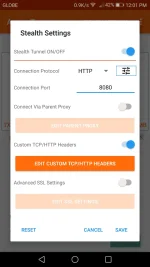
On s†éálth Tunnel & Custom TCP/HTTP HEADERS .
Second Step:
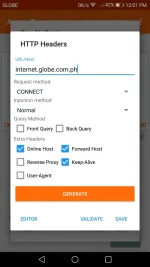
Click Edit Custom TCP/HTTP Headers &
Write internet.globe.com.ph
Click Online-Host , Forward Host , Keep Alive
Save✓
Third Step:
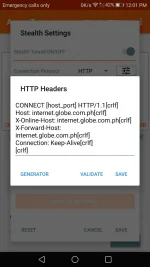
Generate & Save✓
Fourth Step:
(NEW UPDATE INSERT STEP)
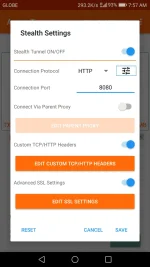
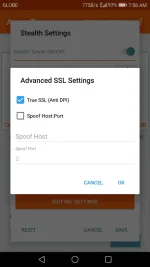
ON Advance SSL Settings
Click SSL Setting
Check True SSL (Anti DPI)
Fifth Step:

Click Connect.
Enjoy™
Share ko sainyu sana gumana .
First Step:
On s†éálth Tunnel & Custom TCP/HTTP HEADERS .
Second Step:
Click Edit Custom TCP/HTTP Headers &
Write internet.globe.com.ph
Click Online-Host , Forward Host , Keep Alive
Save✓
Third Step:
Generate & Save✓
Fourth Step:
(NEW UPDATE INSERT STEP)
ON Advance SSL Settings
Click SSL Setting
Check True SSL (Anti DPI)
Fifth Step:
Click Connect.
Enjoy™
