 PH
PHMikotojisignup
Established
paano po yan ma fix please help na po ako hindi po maka open plz help 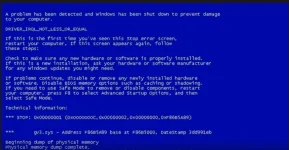
hahaha loko talaga totry to remove your ram. then linisan mo ng eraser.
ibalik mo ulit. pag ganun pa rin. sa thermal phase na yan
sa motherboard po. minsan kasi pag dalawa ram mo tapos 4GB bawat isa
nagkakaganyan din.
palagyan mo ng liquid thermal phase mo po. good po yun para mapalamig ..
hahaha loko talaga to

ewan ko sayo kahit saan nalang nag gaganyan ka nakakaumay na pobakit? ganyan din sira nung akin ah?
kung pwede ngalang ganun nalang sira ng puso ko?
para mas madaling ma fix
ewan ko sayo kahit saan nalang nag gaganyan ka nakakaumay na po
program po nagloko hinde hardware jusko naman oh!! kuyayup safe mode boot. yan kung maaccess mo pwede.
ok nga pala yan. nakalimutan ko sabihin
pag na system restored mo sa tamang date na hindi nag bluescreen yang pc mo. malaki talaga chance na ayos yan. pero kung ako sayo bossing
need mo ipa tingin board mo sa kakilala mong marunong. para iwas malaking gastos marami narin kasing sinungaling na computer technician kumita lang.
program po nagloko hinde hardware jusko naman oh!! kuya
ewan ko sayo nakakainis ka langganito siguro pag inlove
di makapag isip ng ayos nu?
Hi,
Try removing and reseating all cards, memory, and cables (both ends when possible) - actually
remove and replace - do not just snug (this is for a PC not a laptop).
Setup/Settings (BIOS/CMOS) often F2 as you boot - set CD/DVD drive to 1st in the boot order.
Use a Windows 7 DVD to boot and see if you can run Startup Repair (see below). Be sure to
set the boot order back later. On many F12 will allow a one time boot change.
If you do that and can't boot to a Windows disk then you need help from a real computer shop
(not leeks and peeks at a Best Buy or other Big Box Stores) or the System maker's Support.
If possible try with only some of your memory to see if one stick or so is not functioning. Also
try them in different placement order (see below).
--------------------------------------------------------------------
The following actions might prevent an error like this from happening again:
DRIVER_IRQL_NOT_LESS_OR_EQUAL Parameters
- Download and install updates and device drivers for your computer from Windows Update.
- Scan your computer for computer viruses.
- Check your hard disk for errors.
The following parameters are displayed on the blue screen.
Parameter Description
1 Memory referenced
2 IRQL at time of reference
3 0: Read
1: Write
8: Execute
4 Address that
referenced memory
Cause
A driver tried to access an address that is pageable (or that is completely invalid) while the IRQL was too high.
This bug check is usually caused by drivers that have used improper addresses.
If the first parameter has the same value as the fourth parameter, and the third parameter indicates an execute operation, this bug check was likely caused by a driver that was trying to execute code when the code itself was paged out. Possible causes for the page fault include the following:
Soultion
- The function was marked as pageable and was running at an elevated IRQL (which includes obtaining a lock).
- The function call was made to a function in another driver, and that driver was unloaded.
- The function was called by using a function pointer that was an invalid pointer.
stack trace.
If the problem is caused by the driver that you are developing, make sure that the function that was executing at the time of the bug check is not marked as pageable or does not call any other inline functions that could be paged out.
BCCode: D1 0x000000D1 <-- read this
You do not have permission to view the full content of this post. Log in or register now.
-Marco.
ewan ko sayo nakakainis ka lang
try ko lang sabihin nalalaman ko eh
hays ang hirap pala pag ****
very informative..Additional.
Use windows 7 instaler by following this steps below.
These may not help :
If you do not have a Windows 7 disk you can borrow a friends as they are not copy
protected. Your System maker will also sell the physical DVD cheap since you already
own Windows. Also you can make a repair disk on another computer.
Try Startup Repair - (If at ANY point you gain some but not full access to Windows come
back and try Startup Repair again.)
How to Boot to the System Recovery Options in Windows 7
Read here kung panno pumunta.
You do not have permission to view the full content of this post. Log in or register now.
Additional.
Use windows 7 instaler by following this steps below.
These may not help :
If you do not have a Windows 7 disk you can borrow a friends as they are not copy
protected. Your System maker will also sell the physical DVD cheap since you already
own Windows. Also you can make a repair disk on another computer.
Try Startup Repair - (If at ANY point you gain some but not full access to Windows come
back and try Startup Repair again.)
How to Boot to the System Recovery Options in Windows 7
Read here kung panno pumunta.
You do not have permission to view the full content of this post. Log in or register now.
sleep kana kayaeto na talaga ang the best helpful person
thumbs up. im going to get this to my collection too.