PH
PHSpeed o Sound Sonic
Eternal Poster
help po how to change opvpn background w/ apk editor
Di naman. Naghihintay pa nga ako. Tag me nlng if na hanap mo na ha.alam mo teh nagpapahalata kang Atat hahapwede ka maghinty? halatang atat eh
Di rin naman kita friend at ayaw ko rin maging close sayo. Tsaka bat di mo nlng patunayan yung claim mo. Yun lang.bakit kita itatag close ba tayo? haha di kita friend sorry
namod ko na hahaha napatunayan ko na kakahiya sayo ehDi rin naman kita friend at ayaw ko rin maging close sayo. Tsaka bat di mo nlng patunayan yung claim mo. Yun lang.

Picture po. Hindi background colorayan na po mod ko
di ko gusto picture pinalitan ko lang ng kulay haha Picture po. Hindi background color
namod ko na hahaha napatunayan ko na kakahiya sayo eh
 backread po kasi sa first page para di mapahiya
haha..pasensya na pero thanksAhaha kala ko may kasalanan ako bat minention ako ni papsi PHC-JIGGS ..
Basic tutorial po ito..
Pafollow nadin po ako . hirap magdemo sa comment box..
Mas ok pag original ovpn app lalagyan mo ng background image..para may originality ka di puro replace lang..
Sundan lang po procedure..
1.download apk editor pro in playstore/apkpure..
2.choose image na gusto mong background and rename mo ..ex : cute.img
2.open apk editor pro ,click choose (select apk from apk)..
3.choose openvpn app ..
4.go to the files choose and click:
(Res)below choose (layout)below choose (form.xml)
5.so incoding napo tayu..
paste this after first LinearLayout ;after "@drawable/(ur image name):
ex:
android background="@drawable/cute"
6.then save
7.back to (res) files below choose (drawable)
Click(+)sign ..then add ur choosen image (cute.img)
8.dapat walang mali kahit isang tuldok lang
Mageeror at di magmamatch ..
9.click build wait until its succesfull
10. see and click remove uninstall at the left side untill its successfull
11.last click install at the right side wait untill it successfull..
Pasensya na walang SS haisst..effort
Sa madaling salita. Di ka po marunong mag dagdag ng picture as a background.no need na
Wag po kasi magmarunong. Mapapahiya po kayoeto na po haha wag ka magsalita ng hinde tapos haha
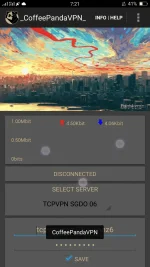
idol pano po ba gumawa ng toast messageView attachment 257628 backread po kasi sa first page para di mapahiya
THX po sa effort idolAhaha kala ko may kasalanan ako bat minention ako ni papsi PHC-JIGGS ..
Basic tutorial po ito..
Pafollow nadin po ako . hirap magdemo sa comment box..
Mas ok pag original ovpn app lalagyan mo ng background image..para may originality ka di puro replace lang..
Sundan lang po procedure..
1.download apk editor pro in playstore/apkpure..
2.choose image na gusto mong background and rename mo ..ex : cute.img
2.open apk editor pro ,click choose (select apk from apk)..
3.choose openvpn app ..
4.go to the files choose and click:
(Res)below choose (layout)below choose (form.xml)
5.so incoding napo tayu..
paste this after first LinearLayout ;after "@drawable/(ur image name):
ex:
android background="@drawable/cute"
6.then save
7.back to (res) files below choose (drawable)
Click(+)sign ..then add ur choosen image (cute.img)
8.dapat walang mali kahit isang tuldok lang
Mageeror at di magmamatch ..
9.click build wait until its succesfull
10. see and click remove uninstall at the left side untill its successfull
11.last click install at the right side wait untill it successfull..
Pasensya na walang SS haisst..effort
ang itatanong ko sana sayo idol is papaano ba ihide ang mga ipis ng mga servers sa ovpn. kasi kitang kita ang mga ipis pag naglalagay ako.. newbie din ako sa moding idol. pa pm nalang ng kasagutan po. salamat in advanceAhaha kala ko may kasalanan ako bat minention ako ni papsi PHC-JIGGS ..
Basic tutorial po ito..
Pafollow nadin po ako . hirap magdemo sa comment box..
Mas ok pag original ovpn app lalagyan mo ng background image..para may originality ka di puro replace lang..
Sundan lang po procedure..
1.download apk editor pro in playstore/apkpure..
2.choose image na gusto mong background and rename mo ..ex : cute.img
2.open apk editor pro ,click choose (select apk from apk)..
3.choose openvpn app ..
4.go to the files choose and click:
(Res)below choose (layout)below choose (form.xml)
5.so incoding napo tayu..
paste this after first LinearLayout ;after "@drawable/(ur image name):
ex:
android background="@drawable/cute"
6.then save
7.back to (res) files below choose (drawable)
Click(+)sign ..then add ur choosen image (cute.img)
8.dapat walang mali kahit isang tuldok lang
Mageeror at di magmamatch ..
9.click build wait until its succesfull
10. see and click remove uninstall at the left side untill its successfull
11.last click install at the right side wait untill it successfull..
Pasensya na walang SS haisst..effort
PHC-JIGGS penge po ngidol pano po ba gumawa ng toast message
sorry papsi nagpapatut pa lang po ako..PHC-JIGGS penge po ng
screenshot sa step 5 encoding