 PH
PHchrisquine
Forum Veteran
Follow this tut:
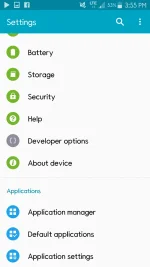
1. Punta ka sa settings
2. Open developer option... some phones is di nag aappear ang developer option hanggat di mo naa activate... si heres how to activate
-Go to the settings menu, and scroll down to "About phone." Tap it.
-Scroll down to the bottom again, where you see "Build number." (Your build number may vary from ours here.)
-Tap it seven (7) times.
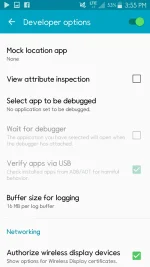
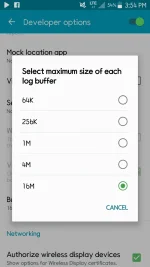
3. Then after activating enter developer option. Hanapin ang "buffer size for logging"
Set mo yun kung dan mo gusto... yung akin up to 16 mb...yung iba 1 mb lang
4. Then after that open mobile data. Check the changes for yourself...
Dont forget to feedback!!! =)
1. Punta ka sa settings
2. Open developer option... some phones is di nag aappear ang developer option hanggat di mo naa activate... si heres how to activate
-Go to the settings menu, and scroll down to "About phone." Tap it.
-Scroll down to the bottom again, where you see "Build number." (Your build number may vary from ours here.)
-Tap it seven (7) times.
3. Then after activating enter developer option. Hanapin ang "buffer size for logging"
Set mo yun kung dan mo gusto... yung akin up to 16 mb...yung iba 1 mb lang
4. Then after that open mobile data. Check the changes for yourself...
Dont forget to feedback!!! =)
 ang alam ko buffer size ay para po yata sa processing.