 PH
PHGTM No Load No Cap (Under Observation)
Need:
Evozi Http Injector
GSwitch (Avail 20MB)
APN Setting: internet.globe.ph
Step1:
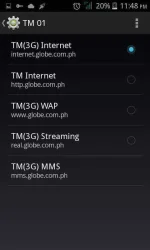
Go to Phone Settings then Click APN
Set APN to internet.globe.ph
Step2:
Go to Gswitch Application
Avail any 20MB Freebies
============================
Explaination:
Need to Avail Gswitch Promo to have an internet connection
so you can connect to Lifetime VPN. And Later on so you can
Open the free servers of Evozi
============================
Step3:
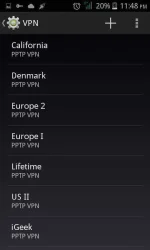
Go to Phone Settings then Click VPN
Set Any of this Lifetime PPTP VPN
Sample:
Name: ANY
Server:us1.vpnbook.com
Connect and input the Username and Password
Username: vpnbook
Password: sun2ymf
===========================
Username: vpnbook
Password: sun2ymf
Server #1: euro217.vpnbook.com
Server #2: euro214.vpnbook.com
Server #3: us1.vpnbook.com
Server #4: us2.vpnbook.com
Server #5: ca1.vpnbook.com
Server #6: de233.vpnbook.com
===========================
Assuming Connected.
Step4:
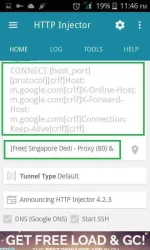
Go to Evozi Http Injector
Setting the Payload:
m.google.com
*Connect
*Normal
*Dual Connect
*Keep Alive
or
apps.google.com
*Connect
*Normal
*Online
*Forward
*Dual Connect
*Keep Alive
Set Buffer Size:
99999
99999
Set DNS:
Either Google or
208 67 220 220
208 67 222 222
Find the Servers:
Usually there are 3 servers.
Netherland
Singapore
Singapore DEDI (Recommended)
Enable all:
SSH & Proxy
Port 80
Hit Connect.
Wait to Connect. Sometimes the Server is Busy.
Sometimes SSH Proxy Premature. But deal with it.
Soon it will connect and Stabilized.
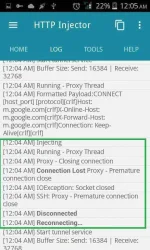
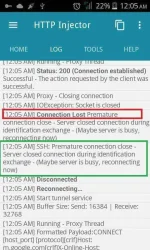
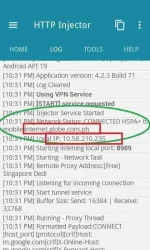
Note: Disconnect the VPN before running the Evozi HTTP Injector
Step5:
For testing.
DL any APP in Playstore more than 20MB
=============================
For Me I downloaded Yu-Gi-Oh which is 63MB
=============================
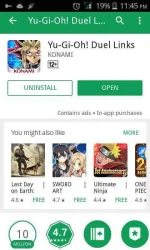
Note: Speed is Good but not the best.
240-360px in youtube.
Good in Browsing.
Good in Playing OL Games (Yu-Gi-Oh Tested)
Like and Follow for more Updates.
Feedback.
Need:
Evozi Http Injector
GSwitch (Avail 20MB)
APN Setting: internet.globe.ph
Step1:
Go to Phone Settings then Click APN
Set APN to internet.globe.ph
Step2:
Go to Gswitch Application
Avail any 20MB Freebies
============================
Explaination:
Need to Avail Gswitch Promo to have an internet connection
so you can connect to Lifetime VPN. And Later on so you can
Open the free servers of Evozi
============================
Step3:
Go to Phone Settings then Click VPN
Set Any of this Lifetime PPTP VPN
Sample:
Name: ANY
Server:us1.vpnbook.com
Connect and input the Username and Password
Username: vpnbook
Password: sun2ymf
===========================
Username: vpnbook
Password: sun2ymf
Server #1: euro217.vpnbook.com
Server #2: euro214.vpnbook.com
Server #3: us1.vpnbook.com
Server #4: us2.vpnbook.com
Server #5: ca1.vpnbook.com
Server #6: de233.vpnbook.com
===========================
Assuming Connected.
Step4:
Go to Evozi Http Injector
Setting the Payload:
m.google.com
*Connect
*Normal
*Dual Connect
*Keep Alive
or
apps.google.com
*Connect
*Normal
*Online
*Forward
*Dual Connect
*Keep Alive
Set Buffer Size:
99999
99999
Set DNS:
Either Google or
208 67 220 220
208 67 222 222
Find the Servers:
Usually there are 3 servers.
Netherland
Singapore
Singapore DEDI (Recommended)
Enable all:
SSH & Proxy
Port 80
Hit Connect.
Wait to Connect. Sometimes the Server is Busy.
Sometimes SSH Proxy Premature. But deal with it.
Soon it will connect and Stabilized.
Note: Disconnect the VPN before running the Evozi HTTP Injector
Step5:
For testing.
DL any APP in Playstore more than 20MB
=============================
For Me I downloaded Yu-Gi-Oh which is 63MB
=============================
Note: Speed is Good but not the best.
240-360px in youtube.
Good in Browsing.
Good in Playing OL Games (Yu-Gi-Oh Tested)
Like and Follow for more Updates.
Feedback.
