 PH
PHfrankiestein
Eternal Poster
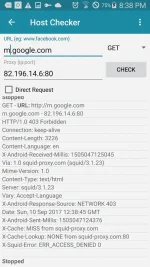
Finally, I found out how to set up ehi to get 800 mb a day using globe promo or globe switch for tm depending on available free offers. Guess what? It's not status 200 payload but 403 forbidden. In order to avail internet using globe or tm, we need to use google based payload and a remote proxy that will give 403 status when we check the payload and remote proxy on the built-in Host Checker of http injector.
For example, we'll use the squid proxy for Europe servers of bestvpnssh.com 82.196.14.6:80. you can use it for ssh accounts for Premium Germany that you can create on the said site. I personally prefer bestvpnssh because its Germany SSH is significantly fast.
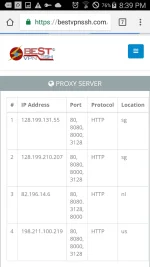
On the Host Checker, paste your remote proxy and type in your payload. For example: m.google.com
Or clients3.google.com
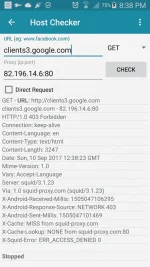
As long as you get 403 Forbidden and keep-alive connection, you're good to go.
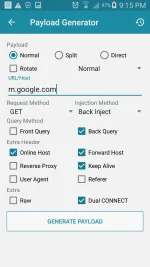
Now, try if it's working by using Front Inject GET method on Payload Generator.
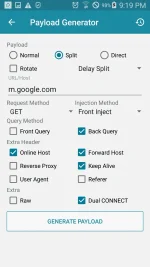
Test your configuration, it should run like this:
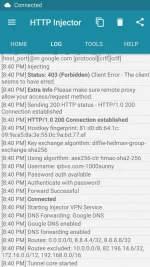
For the SSH Settings, you must use 22 for the port. Please note that the remote proxy I used as an example is not the best SSH squid proxy to use as sometimes it doesn't work fine giving error 503 wherein you need to change SSH port 22 in to 80 for it to work. However, to avoid browsing suspension we must use port 22 and importantly get 403 status when payload is checked against your remote proxy. So it's better to test the best SSH providers that will satisfy you. Forget about checking your payload on check-host.net if 200 status because what matters most is the result of Host Checker on http injector.
After testing your configuration, it's best to change it in to Back Inject GET method because it's faster.
Promo Lists:
● Globe Promo: (800mb capping)
• TXT10 (1 Day)
• SULITXT1515 (1 Day)
• VIBER30 (5 Days)
Send to 8080
● TM Promo:
• Globe Switch
Note: Always turn off your surfalert. Text SURFALERT OFF to 8080 to avoid browsing suspension. Remember that when you turn it off, your load will be consumed so make sure you have no load left, only promo or switch.
Also check my other thread for more tricks: https://phcorner.org/t/choosing-your-remote-proxy-for-http-injector-set-up.405978/#post-6148671
For example, we'll use the squid proxy for Europe servers of bestvpnssh.com 82.196.14.6:80. you can use it for ssh accounts for Premium Germany that you can create on the said site. I personally prefer bestvpnssh because its Germany SSH is significantly fast.
On the Host Checker, paste your remote proxy and type in your payload. For example: m.google.com
Or clients3.google.com
As long as you get 403 Forbidden and keep-alive connection, you're good to go.
Now, try if it's working by using Front Inject GET method on Payload Generator.
Test your configuration, it should run like this:
For the SSH Settings, you must use 22 for the port. Please note that the remote proxy I used as an example is not the best SSH squid proxy to use as sometimes it doesn't work fine giving error 503 wherein you need to change SSH port 22 in to 80 for it to work. However, to avoid browsing suspension we must use port 22 and importantly get 403 status when payload is checked against your remote proxy. So it's better to test the best SSH providers that will satisfy you. Forget about checking your payload on check-host.net if 200 status because what matters most is the result of Host Checker on http injector.
After testing your configuration, it's best to change it in to Back Inject GET method because it's faster.
Promo Lists:
● Globe Promo: (800mb capping)
• TXT10 (1 Day)
• SULITXT1515 (1 Day)
• VIBER30 (5 Days)
Send to 8080
● TM Promo:
• Globe Switch
Note: Always turn off your surfalert. Text SURFALERT OFF to 8080 to avoid browsing suspension. Remember that when you turn it off, your load will be consumed so make sure you have no load left, only promo or switch.
Also check my other thread for more tricks: https://phcorner.org/t/choosing-your-remote-proxy-for-http-injector-set-up.405978/#post-6148671

 very informative