 PH
PHDora The Explorer
Forum Guru
Here’s a simple way to create a digital watermark using your signature that you can use as a Photoshop brush. This 5-minute video from Colin Smith of You do not have permission to view the full content of this post.
Log in or register now. shows you the steps needed using just a paper, pencil, and a smartphone.
To write your signature, Colin recommends using a nice soft pencil to create thick lines with texture. You’ll need a clean white piece of paper to write on, which will make the signature easier to extract in Photoshop.

Next, you’ll need to take a photo or scan of the signature. A smartphone works fine for this purpose, but if you want a perfect copy you could use a scanner. Import the image into Photoshop, where you will clean it up and create a brush from it.
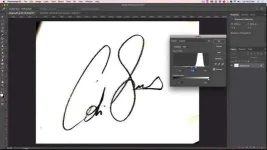
Create a Levels adjustment by going to Image>Adjustments>Levels. By bringing the white point down and the black point up you will increase the contrast in the image and clean up the background. Adjust the midtone until you have an image with natural texture.
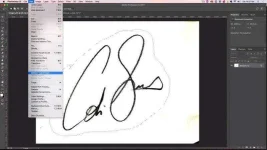
Now create a selection around your signature using the lasso tool, and then go to Edit>Define Brush Preset…. This will create a brush from your selection.
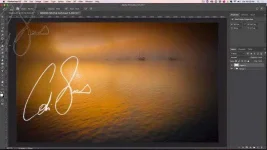
Now, when you want to watermark your image in Photoshop, just create a new layer, select your signature brush from the brush palette, select a foreground color (likely black or white) and then click once on your image to stamp the signature. You can apply blending modes or resize the brush as you wish to suit your image.
To write your signature, Colin recommends using a nice soft pencil to create thick lines with texture. You’ll need a clean white piece of paper to write on, which will make the signature easier to extract in Photoshop.
Next, you’ll need to take a photo or scan of the signature. A smartphone works fine for this purpose, but if you want a perfect copy you could use a scanner. Import the image into Photoshop, where you will clean it up and create a brush from it.
Create a Levels adjustment by going to Image>Adjustments>Levels. By bringing the white point down and the black point up you will increase the contrast in the image and clean up the background. Adjust the midtone until you have an image with natural texture.
Now create a selection around your signature using the lasso tool, and then go to Edit>Define Brush Preset…. This will create a brush from your selection.
Now, when you want to watermark your image in Photoshop, just create a new layer, select your signature brush from the brush palette, select a foreground color (likely black or white) and then click once on your image to stamp the signature. You can apply blending modes or resize the brush as you wish to suit your image.