PH
PHDora The Explorer
Forum Guru
How to Fix or Repair a Pen Drive or SD card Thats Broken or Not Recognized
An age old problem. Every computer user has faced this problem. What I speak of, is the tragedy of the corrupted USB Pen drive or SD Card. No matter what you do, at some point, your computer will simply refuse to read your USB drive. Fortunately though, there are ways to rectify this with one only needing to use a command prompt.
Step 1:
Connect the corrupted drive to your machine
Step 2:
Open the command prompt either by typing cmd in the Start menu search bar or by hitting Windows Key + R followed by typing cmd in the dialog box that pops up.
Step 3:
In the command prompt, enter the following commands.
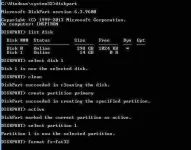
Type diskpart and press Enter.
Next type list disk and press Enter.
Step 4:
Then type select disk followed by the number of your disk and hit enter
Step 5:
After the disk is selected, you will need to type clean into the command prompt and hit enter.
Step 6:
Next command is creates partition primary.
Step 7:
Type active and hit enter followed by select partition 1.
Step 8:
In the last step, type format fs=fat32 and press enter. Once this step is completed you should find your USB drive working as good as new. If not, go back through the steps and see what you missed. A screenshot of how the process looks is attached below.