try this boss
1. Open the Control Panel
2. Click on “System and Security”:
3. Click on “System”.
4. In the sidebar, click on “Advanced System Settings”:
5. Go to the tab “Advanced” and click on “Settings”:
6. Scroll down the list, at the bottom double-check that the item “Use Visual Styles on Windows and Buttons” is checked. If this is not checked, your Windows 7 theme will be stuck on “classic” for a long time, because this completely disables your fancy visual Aero appearance.
Pag hindi parin boss
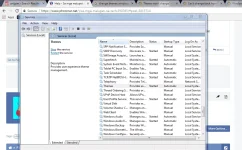
Make sure boss na theme Services is started.
1. Click on “Start” and enter “services.msc” into the search field. Click on the item that appears.
2. Scroll down the list until you find the item “Themes” (or enter Themes while one item is selected)
3. You will now see if the Themes service is running currently and what mode it is in (Automatic, Disabled, Manual):
4. If it’s currently “Disabled” or in “Manual” mode and not started, you have to start it manually and change the mode to “Automatic”.
5. Double-click on “Themes” and from the dropdown select “Automatic”, click on “Start” and then on “Apply”
 PH
PH